Weekly Status Report Template for Client Projects (Free Excel + Email)
A weekly status report is a short update you send every week to tell stakeholders where a project stands: an overall status, what was finished, what comes next, what you need from them, and which risks or decisions are open. When the reader is a client, its main job is to make their next action obvious, so the client never has to ask "where are we?"
Quick answer: use five sections in this order: overall status (a color and a one-line reason), needed from you (client tasks with a name and a due date), done this week, coming next week, and risks and decisions. Keep it to one screen, send it on the same day every week, and link to the work instead of describing it. You can download the free Excel template or copy the email version below.
Key takeaways:
- Put "needed from you" second, right after the status. On client projects, most delays come from waiting on the client: content, approvals, access, feedback. If those requests sit at the bottom of the report, they get missed.
- Every color needs a reason. "Amber" alone tells the client nothing. "Amber: service page copy is three days late; the launch date holds if it arrives by January 13" tells them what to do.
- Report decisions with options and a date. When something needs the client's call, give two or three options and the date you need a decision by.
- Short beats complete. A client who reads a five-line update every week knows more than one who skims a two-page report once a month.
What a Weekly Status Report for a Client Should Include
A weekly status report for a client has five sections, and each one answers a question the client would otherwise send you by email. Internal status reports are often written for a manager who wants detail. A client report is written for someone who wants to know whether to worry and what they need to do.
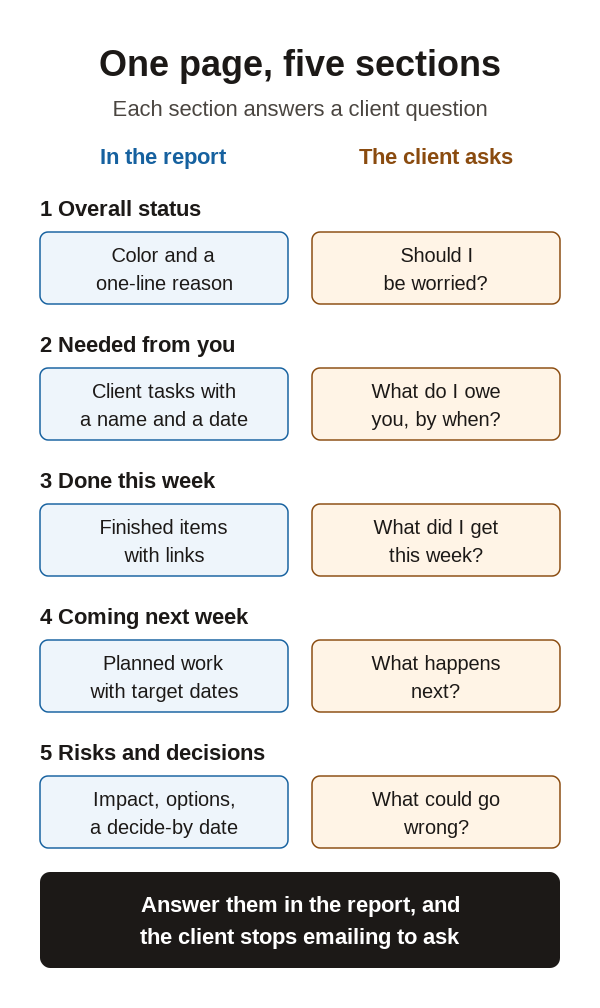
The figure maps each section to the question behind it. Here is what goes into each one.
| Section | What to write | What to leave out |
|---|---|---|
| 1. Overall status | Green, amber, or red, plus one sentence explaining why. The next milestone and its date | A paragraph of background |
| 2. Needed from you | Each request with the client-side person's name, the due date, and what it blocks | Vague asks like "please send content when you can" |
| 3. Done this week | Finished items, each with a link to where the client can see it | Hours worked, or tasks that are "almost done" |
| 4. Coming next week | Planned work with target dates | Every internal subtask |
| 5. Risks and decisions | The risk, its impact if nothing changes, the options, and the date a decision is needed | Problems with no proposed way forward |
Why "needed from you" comes second. In agency and consulting work, the work your team controls is rarely what moves the date. The homepage copy that hasn't arrived, the design review sitting in someone's inbox, the server access nobody has granted: these are what slip a launch. Putting the client's open items near the top makes them the second thing the client reads, right after "should I worry?" If the list is empty, write "Nothing this week" so they know it was checked.
Why "done" comes after "needed." Clients want to see progress, and a list of finished work with links builds trust over time. But a long done list at the top pushes the client's own to-dos below the fold. Lead with what needs action, then show the progress.
Free Weekly Status Report Template (Copy-Paste)
Pick the version that matches how you send updates. All three use the same five sections, so you can switch later without retraining the client.
Excel version (download)
Download the weekly status report template (Excel, .xlsx)
The file has two tabs:
- Weekly report: a header (project, client, week, prepared by, overall status, one-line reason, next milestone) and four tables for the remaining sections. The status cell has a Green / Amber / Red drop-down, and the "Needed from you" table has a Waiting / Received / Overdue drop-down so you can see overdue client items at a glance.
- Example (web agency): the same sheet filled in for a website redesign, so you can see how specific each line should be. The project and names are illustrative.
Copy the tab each week (or add a new row block) to keep a running history. It opens in Excel, and it also works in Google Sheets after you upload it to Google Drive.
Email version
Most client updates go out as an email. Paste this into the body, not as an attachment, so the client can read it in the preview pane.
Subject: [Project name] weekly update, week of [date] — [Green/Amber/Red]

Hi [Client name],

Here's this week's update on [project name].

OVERALL: [Green/Amber/Red] — [one-sentence reason].
Next milestone: [milestone] on [date].

NEEDED FROM YOU
- [Request] — [name], by [date]. This blocks [what it blocks].
- [Request] — [name], by [date].
(If nothing: "Nothing needed from you this week.")

DONE THIS WEEK
- [Item] — [link]
- [Item] — [link]

COMING NEXT WEEK
- [Item] — target [date]
- [Item] — target [date]

RISKS AND DECISIONS
- [Risk or decision]. If nothing changes: [impact].
  Options: A) [option] B) [option]. We need a decision by [date].
(If nothing: "No open risks this week.")

Reply here or add comments to [link to project space] if anything looks off.

[Your name]
One-page document version
For clients who forward your update to their own management, a one-page document (Google Docs, Word, or a page in your project space) travels better than an email thread.
[Project name] — Weekly Status Report
Week: [YYYY-MM-DD to YYYY-MM-DD]   Prepared by: [name]   Sent: [date]

1. OVERALL STATUS: [Green / Amber / Red]
   Why: [one sentence]
   Next milestone: [name], [date]   Launch / end date: [date]

2. NEEDED FROM YOU
   | Request | Who | Due | Status | Blocks |

3. DONE THIS WEEK
   | Item | Where to see it |

4. COMING NEXT WEEK
   | Item | Owner | Target date |

5. RISKS AND DECISIONS
   | Risk / decision | Impact if nothing changes | Options | Decide by |
Keep the same headings every week. When the structure never changes, the client learns where to look, and a change of color or a new "needed from you" line stands out.
How to Pick Green, Amber, or Red
The status color is the line clients read first, so define the colors before the project starts and tell the client what each one means. The definitions below are a practical starting point; adjust them in your kickoff and keep them the same for the whole project.
| Color | Use it when | What the client should do |
|---|---|---|
| Green | The agreed date, scope, and budget will hold, and no open risk is likely to change that | Nothing beyond the "needed from you" items |
| Amber | Something could move the date, scope, or budget, but your team can still recover without the client changing anything | Watch the risk; act on any request tied to it |
| Red | The date, scope, or budget will not hold unless the client makes a decision or changes something | Make the decision listed in "risks and decisions" by the stated date |
Three rules keep the color honest:
- The color always comes with a reason. Write the reason in one sentence, in plain language, right next to the color.
- Red means the client has to act. If you mark a project red, the "risks and decisions" section must say what decision you need, from whom, and by when. Red with no request leaves the client anxious and helpless.
- Don't stay green until the last week. A project that reports green for two months and then turns red the week before launch damages trust more than an honest amber in week three. Some teams call this "watermelon reporting": green outside, red inside. Moving to amber early, with a recovery plan, is the safer call.
A late client deliverable is a common reason for amber. Say so directly and tie it to the date: "Amber: copy for the service pages was due January 5 and hasn't arrived. If it arrives by January 13, launch stays on February 15." That sentence is factual, not accusatory, and it tells the client exactly what keeps the project on track.
Filled-In Example: Website Redesign
Here is the email version filled in for an illustrative web agency project. Compare it with the template above to see how specific each line should be.
Subject: Website redesign weekly update, week of Jan 4 — Amber

Hi Priya,

Here's this week's update on the website redesign.

OVERALL: Amber — copy for the five service pages was due Jan 5 and
hasn't arrived. If it arrives by Jan 13, the Feb 15 launch holds.
Next milestone: build complete on Jan 29.

NEEDED FROM YOU
- Final copy for the 5 service pages — Priya, by Jan 13.
  This blocks the page build and the launch date.
- Approval of the homepage design (v2) — Priya and your CEO, by Jan 11.
  This blocks the front-end build.

DONE THIS WEEK
- Homepage design v2 uploaded for review — [review link]
- Staging site set up — [staging link]
- Analytics and redirect plan agreed — notes from our Jan 6 call [link]

COMING NEXT WEEK
- Build the homepage and About page — target Jan 15
- Prepare the 301 redirect list for old URLs — target Jan 14

RISKS AND DECISIONS
- Service page copy is late. If nothing changes, launch moves one week
  for every week of delay after Jan 13.
  Options: A) Launch on Feb 15 with 3 service pages and add 2 later.
  B) Move launch to Feb 22 with all 5. We need a decision by Jan 13.

Reply here or comment in the project room if anything looks off.

Sam
What makes this example work:
- The status reason names the cause and the deadline that saves the date, so the client knows exactly what to do.
- Every request has a person, a date, and what it blocks. "What it blocks" is the line that gets things moving, because it ties a small task to the launch date the client cares about.
- The decision has two concrete options and a deadline. The client can reply with "A" instead of booking a call.
- Every done item has a link, so the client can check the work without asking for files.
The Example tab in the Excel download contains the same project as a spreadsheet.
Variations for Different Kinds of Client Work
The five sections stay the same, but what goes into each one shifts with the type of work.
| Type of work | What "done" usually lists | Typical "needed from you" items | What to watch in risks |
|---|---|---|---|
| Web or creative agency | Designs and pages ready for review, with links | Copy, images, brand assets, design approvals | Late assets, rounds of revisions beyond the agreed number |
| Software development | Features finished and deployed to staging, test results | Test accounts, API access, acceptance testing, answers to spec questions | Scope added mid-sprint, slow acceptance testing |
| Marketing retainer | Campaigns launched, content published, results this week | Approvals on copy and budgets, access to ad accounts | Spend pacing, approvals that hold up launch dates |
| Consulting engagement | Interviews held, analyses finished, drafts shared | Data exports, interview scheduling, stakeholder availability | Missing data, stakeholders who can't be reached before the deadline |
For retainers with no single launch date, replace "next milestone" with this month's goal and progress against it. For fixed-scope projects, keep the end date in the header every week so any change is visible.
How to Write a Weekly Status Report in 20 Minutes
A weekly report should take minutes, not an afternoon. If yours takes longer, the problem is usually that the information lives in too many places. These steps assume you have one task list and one place where files and notes live.
Step 1: Fix the day and time
Send the report on the same day every week, such as Friday morning or Monday morning. Clients start to expect it, and a missing report becomes a signal in itself. Put a recurring block in your calendar for writing it.
Step 2: Start from "needed from you"
Open the task list and filter for tasks owned by the client. Copy each open one into the report with its owner, due date, and what it blocks. Mark any past their due date as overdue. Doing this first keeps the most important section from being written in a rush at the end.
Step 3: Pull done and next from the task list
List the tasks completed since the last report and the ones scheduled for the coming week. Add a link to each finished item. If you find yourself writing "in progress" items under done, move them to next week.
Step 4: Write risks and decisions
Ask two questions: what could move the date, scope, or budget, and what does the client need to decide? Write each risk with its impact and options. If there's nothing, write "No open risks this week."
Step 5: Choose the color last
Pick green, amber, or red only after the other sections are written, using the definitions you agreed with the client. The color is a summary of the report, so it should come from the content, not the other way around. Then write the one-sentence reason.
Step 6: Read it as the client and send
Read the report from the top as if you were the client. Can you tell in ten seconds whether to worry and what you need to do? If not, shorten it. Then send it and log the date, so you can point back to it if a dispute about dates comes up later.
Subject Lines and Opening Lines
A consistent subject line makes weekly updates easy to find and easy to search later.
| Situation | Subject line |
|---|---|
| Standard weekly update | [Project] weekly update, week of [date] — Green |
| Something needs the client's action | [Project] weekly update — action needed by [date] |
| Status changed this week | [Project] weekly update — now Amber (was Green) |
| Decision needed | [Project] weekly update — decision needed by [date]: [topic] |
| Retainer or ongoing work | [Client] [month] week [n] update |
Opening lines work best when they are one sentence and point to what matters:
- "Here's this week's update. One item needs your input by Wednesday; the rest is on track."
- "Quick update: we moved to amber this week because of a delay on our side. The recovery plan is below."
- "Nothing needed from you this week. Highlights and next steps are below."
If the delay is on your side, say so in the opening line. Clients forgive a delay you report early and own; they remember the one they discover themselves.
Common Mistakes That Make Clients Stop Reading
1. Writing it for your team instead of the client
Internal jargon, ticket numbers, and every subtask make the report hard to read for someone outside your team. Write in the client's terms: pages, features, deliverables, dates.
2. Hiding client requests at the bottom
If "needed from you" comes after a long done list, the client reads the good news and stops. Keep requests near the top, and repeat any overdue one every week until it's resolved.
3. Status colors without reasons
A color with no explanation trains the client to ignore it. Every color gets one sentence.
4. Reporting problems without options
"The API integration is delayed" leaves the client with nothing to do but worry. "The API integration is delayed because test credentials haven't arrived; we can either mock the API and keep the schedule, or wait and move the date one week. Which do you prefer by Thursday?" turns a problem into a decision.
5. Changing the format every week
A new layout each week forces the client to search for the information they need. Keep the headings fixed and let the content change.
6. Treating the report as the record of decisions
A weekly email is easy to lose. When a client makes a decision in reply to your report, record it where the project's decisions live (meeting notes, a decision log, or the project space) and mention in the next report that it was recorded.
Status Report, Status Meeting, or Shared Dashboard?
These are complementary, not alternatives. Each one does a different job.
| Format | Best for | Limits |
|---|---|---|
| Weekly status report | A fixed summary the client can read in two minutes and forward to their management | Out of date as soon as it's sent |
| Weekly status meeting | Discussing decisions and risks that need back-and-forth | Takes everyone's time; weak as a record unless someone writes notes |
| Shared project space or dashboard | Letting the client see live tasks, files, and what is waiting on them at any time | Clients don't always check it on their own |
A common pattern is to keep the shared space as the live source, send the weekly report as a summary with links into it, and use the meeting only for decisions. If the report already covers status, the meeting can be shorter, or skipped in a quiet week.
Making the Weekly Report Less Work
The weekly report becomes a chore when you have to rebuild it from scattered emails, chat threads, and files every Friday. Asana's research found that knowledge workers spend 60% of their day on "work about work," such as searching for information and chasing status updates (Asana, Anatomy of Work Index 2021). Status reporting is part of that overhead, so the lever is where the information lives, not how fast you type.
| Setup | How the report gets written | Watch out for |
|---|---|---|
| Spreadsheet or document | Copy last week's report, update each section by hand | Easy to start; client requests live in email and get missed |
| Project management tool (Asana, Trello, Basecamp, etc.) | Filter tasks by owner and date, paste into the report | Clients may not have accounts, so their tasks end up tracked separately |
| Shared client workspace (e.g., Terasu) | Client tasks, files, and notes are already in one place the client can see; the report summarizes them | Doesn't replace your invoicing or contract tools |
Terasu is our product, so read this paragraph with that in mind. Each client project in Terasu gets a Room that holds tasks, files, meeting notes, and messages shared with the client, and a task can be assigned to a person on the client side with a due date, which is exactly the "needed from you" list. On Solo and above, you can set a schedule so the AI drafts a weekly progress report from the Room's tasks, notes, and file views; drafts stop for your review, and nothing is sent to the client until you approve it (Terasu home page, pricing). If you also want an agency-focused comparison of client portals, see client portal for agencies.
Put client tasks, files, and notes for each project in one Room the client can see. Free plan available.
Try Terasu freeFrequently Asked Questions
What should a weekly status report include?
Five sections: an overall status with a one-sentence reason, what you need from the reader (with names and due dates), what was done this week, what's coming next week, and open risks and decisions. For a client report, put the "needed from you" section second so the client sees their own action items right after the status.
Is there a free weekly status report template in Excel?
Yes. You can download this article's weekly status report template for free with no sign-up. It includes a blank report and a filled-in example, with drop-downs for the status color and for client request status. It also opens in Google Sheets after you upload it to Google Drive.
How long should a weekly status report be?
Short enough to read in about two minutes: usually one screen of email or one page of a document. Link to the work instead of describing it. If the report keeps growing, move detail into the project space and keep the report as a summary.
What do green, amber, and red mean in a status report?
A common convention is green for on track, amber for at risk but recoverable by the team, and red for off track unless the client makes a decision. Agree on the exact definitions with the client at kickoff, and always write a one-sentence reason next to the color.
When should I send a weekly status report to a client?
On the same day and at about the same time every week, such as Friday morning or Monday morning. Consistency matters more than the specific day, because the client learns when to expect it and a missing report stands out.
Should I send the report even when nothing changed?
Yes. Send a short version: status, "nothing needed from you this week," and next week's plan. A skipped week makes clients wonder whether the project has stalled, and a two-line update takes a minute to write.
How do I report a delay caused by the client?
State the facts and tie them to the date without blame: what was due, when, what it blocks, and the date by which it must arrive to keep the schedule. Then give options, such as launching with part of the scope or moving the date, and ask for a decision by a specific day.
Summary
A weekly status report for a client works when it answers the client's questions before they ask.
- Five sections: overall status, needed from you, done this week, coming next week, risks and decisions
- Order matters: status first, client requests second, progress after that
- Colors need reasons: green, amber, or red, always with one plain sentence
- Decisions need options and a date, so the client can answer in one reply
- Same day, same format, every week, with links to the work instead of descriptions
Start with the Excel template or the email version above, agree on the color definitions with your client, and send the first one this week. If your project plan itself needs work, the action plan template covers how to break goals into owned, dated tasks.
Further reading
- Client Portal for Agencies: What It Must Do, and 7 Options Compared (2026)
- Client Portal for Consultants: 6 Options Compared by the Job You Need Done (2026)
- Action Plan Template: Free Excel Download + 9 Formats with Examples
- Mutual Action Plan Template: 3 Copy-Paste Examples (SaaS, Enterprise, SMB) 2026
- Proposal & Quote Follow-Up Emails: 15 Templates, Subject Lines & a Day-by-Day Cadence (2026)
- Sales Handover Documents: Free Template, Customer Handover Process, and Checklist (2026)