Client Portal for Agencies: What It Must Do, and 7 Options Compared (2026)
A client portal for agencies is one shared place where an agency and its client exchange files, collect assets, record approvals and scope decisions, and see who owes what next. It replaces the mix of email threads, shared folders, and status calls that most agency projects run on. Some portals also handle invoices, payments, and contracts; others focus only on the project work.
Quick answer: if you mainly need to bill clients, get contracts signed, and put everything behind your own brand, look at an all-in-one portal such as SuiteDash or Assembly (formerly Copilot). If you run structured onboarding with document requests and sign-offs in a regulated field, look at Moxo. If your team already plans work in a project tool, Basecamp's Client mode may be enough. If your real pain is that client assets and approvals stall in the middle of a project, a project room such as Terasu fits better. For a handful of files, Google Drive or Notion shared with the client still works.
Key takeaways:
- Decide what the portal must hold before you compare tools. Agency portals do five jobs: asset collection, approvals, scope decisions, status, and files. Billing and contracts are a sixth job that only some tools take on.
- Check how clients are counted. Basecamp counts every person you add, clients included, toward the user limit on every plan except Pro Unlimited. SuiteDash lists unlimited clients on every plan. Terasu does not count invited clients toward your seats. Assembly limits "active contacts" by plan.
- No single tool wins every row. The tools that take payments and signatures are not the ones built around client-owned tasks and project notes, and the reverse is also true. The comparison table below shows where each one stops.
- Prices change often. We list only the figures shown on each vendor's own pricing page on November 14, 2026, and we say where a vendor does not publish prices.
What an agency client portal has to do
Agency projects rarely slip because of the work your team controls. They slip while waiting on the client: the logo files that never arrive, the homepage review that sits in someone's inbox, the "small change" that nobody agreed was extra scope. A client portal earns its place when it makes those waits visible to both sides.
In practice, an agency client portal has to cover five jobs:
- Asset collection. Copy, photos, logins, brand files, and product data come from the client. The portal needs a way to ask for each one with an owner and a due date, and a place for the client to upload it.
- Approvals. Designs, drafts, and builds need a clear yes from the client. The portal should show what is waiting for review, who on the client side has to review it, and when the review happened.
- Scope decisions. When the client asks for something new, someone has to decide whether it is in scope, extra, or out. The portal should keep that decision next to the request so nobody has to dig through email at sign-off.
- Status. The client should be able to see where the project stands without booking a call: what is done, what is in progress, and what is waiting on them.
- Files. Proposals, wireframes, deliverables, and meeting notes in one place, with the latest version easy to find and internal drafts kept private.
A sixth job, billing and contracts (invoices, online payments, and e-signature), is where tools split. Some agencies want everything client-facing in one branded portal, including the invoice. Others already invoice from accounting software and only need help with the project itself. Decide which camp you are in first, because it removes half the options straight away.
Which client portal fits: start from the job
The quickest way to choose is to name the job that hurts most today, then compare only the tools built for that job.
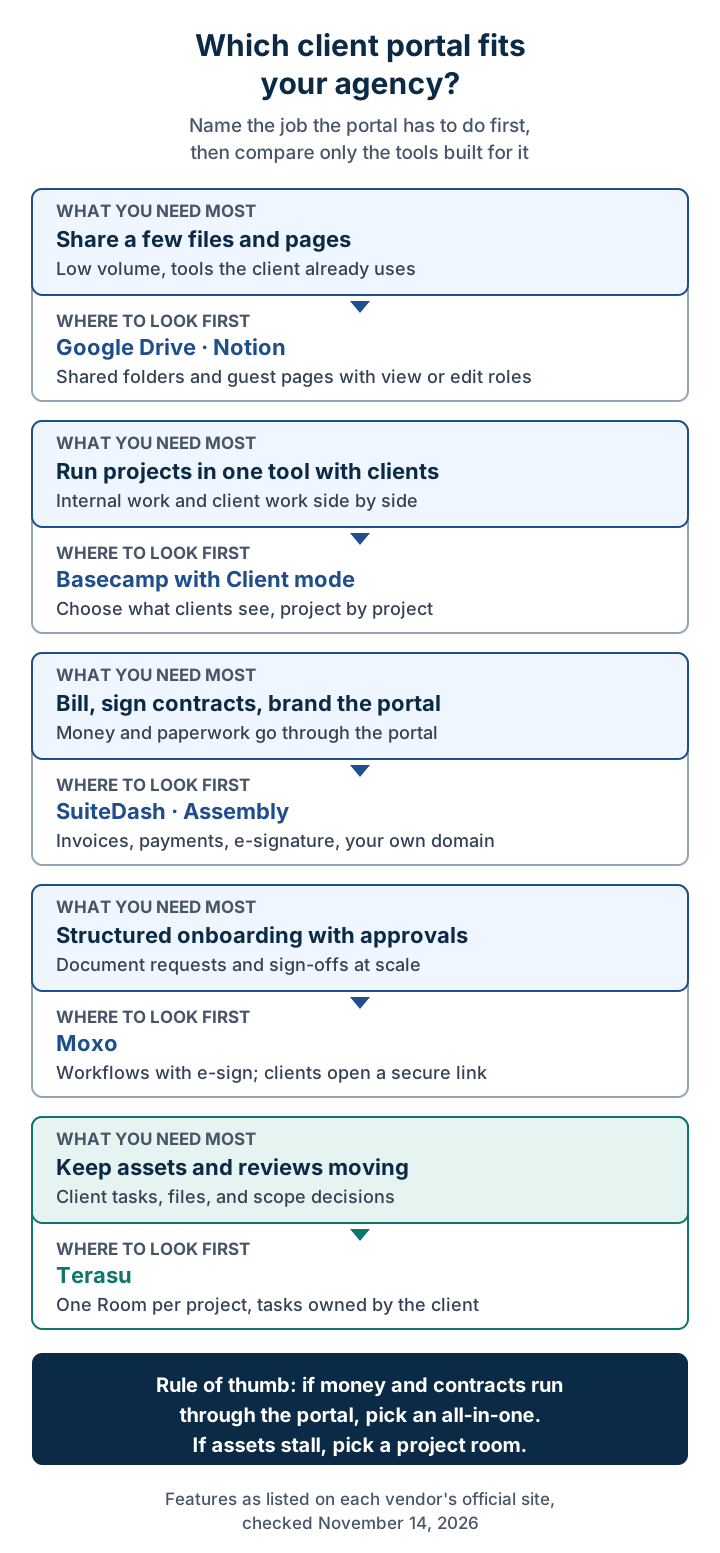
The same routing as a table, with the section to read next:
| Your situation | Where to look first | Read next |
|---|---|---|
| You share a few files and pages with each client and want to stay in tools they already know | Google Drive, Notion | Shared folders and pages |
| Your team already plans work in a project tool and wants clients inside it | Basecamp | Basecamp |
| You want invoices, payments, contracts, and your own domain in one portal | SuiteDash, Assembly | All-in-one portals |
| You run onboarding with document requests and sign-offs, often in regulated work | Moxo | Moxo |
| Client assets, reviews, and scope decisions stall in the middle of projects | Terasu | Terasu |
If you are unsure which row you are in, look at your last three projects that ran late. If the delay came from chasing payment or a signature, you are in the third row. If it came from waiting on assets and reviews, you are in the last row, and a billing-first portal will not fix it.
Waiting on client assets and approvals? Give each project one Room with tasks the client owns.
Start freeCriteria checklist: how to score a client portal
Use these questions to score any tool, including ones not covered here. Answer them for your own agency before you book a demo; a vendor demo will show you the features it is best at, not the ones you need.
| Criterion | Question to ask | Why it matters for agencies |
|---|---|---|
| Asset requests | Can I assign a request to a named person on the client side with a due date? | Missing assets are the most common reason creative and web projects slip |
| Client uploads | Can the client upload files without emailing them? Can they delete my files? | You want client files in the portal, but your deliverables protected |
| Approvals | Is there a clear record of who approved what, and when? | Settles disputes at sign-off and on change requests |
| Scope decisions | Can a decision be written down next to the request it answers? | Stops out-of-scope work from being done for free |
| Internal privacy | Can I keep drafts, internal notes, and pricing discussions hidden from the client? | Clients should see finished work, not your working mess |
| Status view | Can the client see what is waiting on them without a call? | Fewer status meetings, and the client sees their own delays |
| Client access | Do clients need an account and password, a magic link, or nothing? | Every extra step lowers how often clients actually log in |
| Client pricing | Do clients count as paid users or seats? | An agency with 20 clients can triple its bill on a per-user plan |
| Billing and e-signature | Does it send invoices, take payments, or collect signatures? | Only matters if you want money and contracts in the same portal |
| Branding | Can I add my logo and colors? Can it run on my own domain? | Matters more for agencies that sell a premium client experience |
Most agencies care about three or four of these rows far more than the rest. Mark yours before you read the tool sections, and skip the tools that fail any of them.
How we compared these tools
We opened each vendor's own pricing, product, or help page on November 14, 2026 and recorded only what those pages say. We did not use review-site ratings or third-party price lists. Where an official page was unclear or did not cover a point, the table says "not listed" instead of guessing. "Not listed" means we could not confirm the feature on the pages we checked, not that it is impossible; confirm with the vendor if that row matters to you.
One naming note: the client portal that used to be called Copilot renamed itself Assembly on September 30, 2025, and its site is now assembly.com. The copilot.com address no longer points to that product, so search for Assembly if you are looking for it.
Comparison table
| Tool | Type | Asset collection and client uploads | Approvals | Client-owned tasks | Invoices and payments | E-signature | Branding | How clients are counted | Price shown on official page (Nov 14, 2026) |
|---|---|---|---|---|---|---|---|---|---|
| Google Drive | Shared folders | Editors can add files to a shared folder | Comments only | No | No | Not listed | No | Shared by email address (up to 600 per file) | Included in Google Workspace (see Google's pricing) |
| Notion | Shared pages | Guests with edit access can add content | Comments only | Possible with a database page | No | Not listed | No | Guest limit depends on plan | Not quoted (see Notion pricing) |
| Basecamp | Project tool | Docs & Files; to-dos with files attached | No dedicated feature described | To-dos with assignees and due dates | Not listed | Not listed | Project icon (for example, the client's logo) | Every person counts toward the user limit, except on Pro Unlimited | Freelancer $29/month (up to 5 users, 3 projects) |
| SuiteDash | All-in-one portal | File Exchange and forms | "Let Clients approve" work | Projects and tasks | Yes | Yes | White labeling and custom domain | Unlimited clients and staff on every plan | Start $19/month ($180/year) |
| Assembly (formerly Copilot) | All-in-one portal | Clients share files | Not listed | Not listed | Yes, on every plan (processing fees apply) | Clients sign contracts | Custom domain from Professional | Limited by "active contacts" per plan | Free; Starter $29/month billed annually |
| Moxo | Workflow portal | Document requests, forms, uploads | Approvals and acknowledgements | Workflow action steps | Invoices and payments | Yes | Logo, colors | Not published | Not published (demo or trial request) |
| Terasu | Project room | Client editors can upload; they can only edit or delete their own files | Review tracked as a client-owned task | Yes, with owners, due dates, Gantt view | No | No | Workspace logo and colors | Invited clients do not count toward seats | Free plan; Solo $35/month (1 seat) |
Read the "Invoices and payments" and "Client-owned tasks" columns together. The tools that are strongest at money and contracts (SuiteDash, Assembly, Moxo) are built around the business relationship. The tools that are strongest at project work (Basecamp, Terasu) are built around tasks and files. Pick the column that matches the job that hurts most.
Google Drive and Notion: the shared-folder approach
Many agencies start here, and for small projects it is a reasonable choice. The client already has a Google account, you already pay for the tool, and nobody has to learn anything.
Google Drive. According to Google's sharing help page, you can give people outside your organization one of three roles: Viewer, Commenter, or Editor. Viewers cannot comment or share; Commenters can add comments and suggestions; Editors can add, edit, delete, and move files and, by default, change permissions. "Anyone with the link" access is view-only and works without a Google sign-in. A single file can be shared with up to 600 email addresses, and on work or school accounts you can set access to expire within one year and turn off downloading, copying, and printing.
That makes a shared folder fine for files. It does not cover the other four jobs. There is no way to assign an asset request to a person on the client side with a due date, approvals live in comment threads, and status lives in whatever spreadsheet someone remembered to update. Watch the Editor role in particular: a client with Editor access to a shared folder can delete or move your deliverables.
Notion. Notion's sharing and permissions guide describes guests as people outside your workspace, such as "a client you're working with." You can give a guest Full access, Can edit, Can comment, or Can view on a page. A page can also be opened to "Anyone on the web with link," which lets people without a Notion account read it, though they must log in to comment or edit. Workspaces have a guest limit that depends on the plan; check Notion's pricing page for the current numbers, as the figure shown can vary by plan and region.
Notion is more flexible than Drive. You can build a client page with a project brief, a status table, and a task database. The catch is that you are building and maintaining the portal yourself, page by page, for every client. Our guide on where Notion breaks for client-facing work and the one on the risks of sharing through Google Drive go into the permission and tracking problems in more detail.
Choose shared folders or pages if you run a few small projects at a time, clients send files rarely, and approvals happen on calls. Move on when you find yourself keeping a separate spreadsheet of what each client still owes you.
Basecamp: Client mode inside your project tool
Basecamp is a project management tool rather than a dedicated portal, but it has a feature built for agencies. On its features page, Basecamp says its Client mode "lets you decide what they should — and shouldn't — see, project by project," so you can hide unfinished work while keeping conversations with the client on the record.
What clients can work with:
- To-dos that can be assigned, given due dates, and carry attached files and subtasks.
- Docs & Files for images, documents, PDFs, and links to cloud files from Figma, Google Docs, and Dropbox.
- Message boards for feedback. Basecamp's own design agency example shows a studio sharing homepage concepts on a message board for client feedback.
- Project icons, which Basecamp suggests using to put the client's logo at the top of a project.
The features page does not describe a dedicated approvals feature, and invoicing and e-signature are not listed, so plan to handle those elsewhere.
Pricing, from Basecamp's pricing page on November 14, 2026. Plans are flat-priced, with no per-user fee inside each plan's user limit:
| Basecamp plan | Price | Active projects | Users included | Storage |
|---|---|---|---|---|
| Free | $0 | 1 | Up to 3 | 1 GB |
| Freelancer | $29/month | Up to 3 | Up to 5 | 10 GB |
| Pro | $79/month | Up to 8 | Up to 10 | 25 GB |
| Pro Plus | $99/month | Up to 12 | Up to 15 | 100 GB |
| Pro Unlimited | $199/month billed annually ($329 billed monthly) | Unlimited | Unlimited | 1 TB |
The important detail for agencies is in the FAQ: "every person you add is counted," including clients, contractors, and guests, except on Pro Unlimited, which has no user cap. An agency with 8 active projects and two client contacts per project already needs 16 user slots for clients alone, which pushes it past Pro and Pro Plus. Paid plans come with a 30-day free trial with no credit card.
Choose Basecamp if your team already runs its work there and you want clients inside the same projects. Look elsewhere if you need a formal approval record, billing in the portal, or a large number of client contacts on a mid-tier plan.
SuiteDash: an all-in-one portal with white-labeling
SuiteDash positions itself as an all-in-one business platform with a client portal at its center. Its homepage lists features to "share and organize Client files securely," "send invoices and collect payments," "create documents and collect signatures," "present the work and let Clients approve it," forms to "collect information," projects and tasks, and a CRM. It also promises white labeling: "Customize the Client Portal experience with your URL, Logo & Colors."
From SuiteDash's pricing page on November 14, 2026:
| SuiteDash plan | Monthly | Yearly | Storage |
|---|---|---|---|
| Start | $19 | $180 | 100 GB |
| Thrive | $49 | $480 | 500 GB |
| Pinnacle | $99 | $960 | 2 TB |
Every plan includes unlimited clients and staff, which is the main reason agencies with many small clients look at SuiteDash. White labeling and an installable branded web app are listed on Start. The pricing page lists billing, payments and subscriptions, contracts and e-signature, and file exchange as modules but does not map each one to a plan, so confirm the plan you need with SuiteDash. The 30-day free trial needs no credit card and runs on Pinnacle.
Choose SuiteDash if you want one branded portal for proposals, contracts, invoices, files, and projects, and you have many clients. Expect a setup project: a tool that covers this much takes time to configure well, and you will be the one configuring it.
Assembly (formerly Copilot): a branded portal with billing built in
Assembly is the client portal formerly known as Copilot. Its homepage says clients can message your team, share files, sign contracts, and pay through integrated payments, all on "your branded domain." According to the site's FAQ, clients sign in with secure magic links or Google, which removes the password step that keeps many clients from logging in at all.
From Assembly's pricing page on November 14, 2026:
- Free: $0, 1 internal user, 5 active contacts. Client experience, messaging, and billing and payments are included.
- Starter: $29 a month billed annually, or $49 billed monthly; 1 internal user, 50 active contacts.
- Professional, Advanced, and Enterprise: more internal users and contacts (Professional includes 3 internal users and 500 active contacts; Advanced includes 5 internal users and unlimited contacts). Check the pricing page for the current price of each.
Custom domains and removing the Assembly badge start on Professional. Billing and payments are on every plan, and the page notes that payment processing fees apply, with lower rates on higher plans; it does not list the rates.
Choose Assembly if you want clients to pay, sign, and message in one branded place and you like the low-friction magic-link sign-in. Check carefully how many active contacts your agency has; a contact cap is the limit you will hit first.
Moxo: workflow portals for regulated onboarding
Moxo describes itself as an AI workflow automation platform that runs processes with "humans, AI agents, and systems." Its client portal page lists document requests, forms, and uploads; e-signatures, approvals, and acknowledgements; and invoices, payments, and identity checks. Portals carry your logo and colors, and clients need "no accounts, no passwords" and nothing to download; they open one secure link.
Moxo's homepage says it is built for complex, regulated industries and names financial services, legal, accounting, consulting and advisory, and real estate among them. Agencies are not named. Its pricing page does not publish prices; you request a trial or book a demo.
Choose Moxo if your client work is a repeatable process with many document requests and formal sign-offs, such as onboarding in finance or legal-adjacent work. It is likely more than you need if you run creative or web projects where the work changes shape every time.
Terasu: a project room where the client owns tasks too
Terasu is our product, so read this section with that in mind. It is a shared workspace for client work: each project gets a Room that holds files, meeting notes and pages, messages, and tasks, shared between your team and the client. It is aimed at agencies, development shops, and consultancies, and the web production use case is built around the problems in the first section of this guide: missing assets, buried review requests, and unclear scope decisions.
How it maps to the five jobs, based on our product page, pricing page, and help center on November 14, 2026:
- Asset collection. Create an asset request as a task, assign it to a person on the client side, and give it a due date. Client participants with edit access can upload files to the Room, and they can only edit or delete files they uploaded themselves, so your deliverables stay protected.
- Approvals. A review is tracked as a task owned by the client. Tasks have three statuses (Not started, In progress, Done) and can be viewed as a board, a list, or a Gantt chart. There is no separate approval or sign-off button, so the record of who reviewed what is the completed task plus the message or page comment that goes with it.
- Scope decisions. Decisions can be written into meeting notes and pages in the Room. On the Solo and Business plans, the AI can answer questions such as what was decided last time and point to the notes or messages the answer came from.
- Status. Clients see the shared task list and what is waiting on them. You can keep some pages private to your team, and analytics stay internal.
- Files and view analytics. For shared PDFs, Terasu shows who viewed which page and for how long, so you can tell whether the client actually opened the design review before the meeting. Detailed view analytics start on the Solo plan; the Free plan includes basic view logs.
Clients join from the invitation email by setting a name and a password, and invited clients do not count toward your seats. Single files can also go out as share links that open with no account.
Pricing on the official page: Free at $0 for up to 2 users and 3 Rooms; Solo at $35 per month for 1 seat and 10 Rooms; Starter at $69 per month including 3 users (+$15 per extra user) and up to 30 Rooms; Business at $199 per month including 10 users (+$19 per extra user) with unlimited Rooms; Enterprise on request. Every new sign-up gets all Business features free for 14 days with no credit card. Paid plans are billed monthly in US dollars (product page).
Where Terasu is weaker than the alternatives above:
- No invoicing or payments. You cannot bill a client or take a payment through Terasu. SuiteDash, Assembly, and Moxo all can.
- No e-signature. Contracts and statements of work need a separate signing tool.
- No white-label portal on your own domain. You can set a workspace logo and colors, but the portal does not run on your URL the way SuiteDash's or Assembly's can.
- Clients set a password. Assembly and Moxo let clients in with a magic link; Terasu asks clients to set a name and password once.
- No intake form builder is listed, so structured questionnaires at onboarding are better handled in a tool that has one.
Choose Terasu if your projects slow down while waiting on the client, and you want assets, reviews, decisions, and files for each project in one Room the client can see. Choose an all-in-one portal instead if you want invoices, payments, and contracts inside the same branded portal. If your client work is advisory rather than production, our companion guide on client portals for consultants covers that case.
One Room per client project
Assign asset requests and reviews to the client with due dates, keep files and meeting notes together, and see which pages the client actually read. Free plan available; 14-day trial of every Business feature, no credit card.
Start freeWhich to pick: a short, honest summary
| If this is you | Pick | Why not the others |
|---|---|---|
| Freelancer or small studio with a few projects at a time | Google Drive or Notion, or Basecamp Free | A dedicated portal adds setup you will not use yet |
| Agency already running its projects in Basecamp | Basecamp with Client mode | Moving tools costs more than the gaps |
| Agency with many small clients that wants one branded portal for everything | SuiteDash | Per-user or per-contact pricing grows with each client |
| Agency that wants clients to pay, sign, and message in one place with magic-link sign-in | Assembly | Project rooms do not handle money or contracts |
| Firm running document-heavy onboarding in a regulated field | Moxo | Project tools lack formal request, sign-off, and identity steps |
| Web, creative, or development agency whose projects stall on client assets and reviews | Terasu | Billing-first portals do not center on who owes the next task |
Two combinations also work well in practice. Many agencies keep invoicing in their accounting software and use a project room for the work, which avoids paying for portal billing they do not need. Others use an all-in-one portal for onboarding, contracts, and payments, and a project tool for delivery. If you do split them, decide up front which tool is the client's first stop, and link to the other from there.
Setting up an agency client portal: a launch checklist
A portal only helps if the client actually uses it. Most failed rollouts fail in the first two weeks, when the client gets one invitation, forgets about it, and keeps emailing. Use this checklist for the first project you move over.
Before you invite the client
- Pick one live project, not your whole client list. A real deadline makes the portal useful from day one.
- Put the proposal or statement of work in first, so the client opens the portal to something they already know.
- Write the first three asset requests as tasks with a named client owner and a due date.
- Hide internal pages, drafts, and pricing discussions before the client joins.
When you invite
- Invite one main contact first, not the whole client team. Add reviewers when their first review is due.
- In the kickoff meeting, open the portal on screen and show the client where their tasks are. Our mutual action plan guide covers how to agree on owners and dates in that meeting.
- Agree on one rule: files and approvals go through the portal, not email.
In the first two weeks
- When a client emails a file, upload it to the portal yourself and reply with the link, so the habit forms.
- Record the first scope decision in the portal next to the request it answers.
- Review overdue client tasks before each status meeting, and start the meeting with them.
If you are moving from a sales process into delivery, the sales handover guide covers what should carry over from the proposal into the project.
Frequently Asked Questions
What is a client portal for agencies?
It is one shared place where an agency and its client exchange files, collect assets, record approvals and scope decisions, and see what is waiting on whom. Some portals also send invoices, take payments, and collect e-signatures; others focus only on the project work.
What is the best client portal software for agencies?
It depends on the job. For invoices, payments, contracts, and white-labeling in one place, look at SuiteDash or Assembly. For regulated onboarding with formal sign-offs, Moxo. For client access inside an existing project tool, Basecamp. For keeping assets and reviews moving on each project, Terasu.
Is there a free client portal for agencies?
Yes, with limits. On November 14, 2026, Assembly's Free plan covered 1 internal user and 5 active contacts, Basecamp's free plan covered 1 project and up to 3 users, and Terasu's Free plan covered 2 users and 3 Rooms. Google Drive and Notion sharing also work for small projects.
Do clients count as paid users in client portal software?
It varies. Basecamp counts every person you add, clients included, except on Pro Unlimited. SuiteDash lists unlimited clients and staff on every plan. Assembly limits active contacts by plan. Terasu does not count invited clients toward your seats.
Can I use Google Drive or Notion as a client portal?
For files and simple pages, yes. Both let you share with outside people at view, comment, or edit level. Neither gives you client-owned tasks with due dates or a clear approval record, so they work best for small projects where approvals happen on calls.
What happened to the Copilot client portal?
Copilot renamed itself Assembly on September 30, 2025, and the product now lives at assembly.com. Existing client portals kept their URLs, including custom domains. The copilot.com address no longer points to the client portal.
Conclusion
An agency client portal has to cover five jobs: asset collection, approvals, scope decisions, status, and files. Billing and contracts are an optional sixth. Choose by the job that hurts most. If money and paperwork are the problem, an all-in-one portal such as SuiteDash or Assembly fits, and Moxo fits structured onboarding in regulated work. If your team already lives in Basecamp, Client mode may be enough. If projects stall while you wait on the client, a project room such as Terasu, where the client owns tasks with due dates, solves the problem more directly, and you can keep invoicing where it already is.
Further reading:
- Notion for client-facing work: where it breaks
- Google Drive sharing risks and alternatives
- Mutual action plan guide
- Sales handover guide
- DocSend alternatives
Sources (all checked November 14, 2026): Google Drive sharing help, Notion sharing and permissions, Notion pricing, Basecamp features, Basecamp pricing, Basecamp design agency example, SuiteDash homepage, SuiteDash pricing, Assembly homepage, Assembly pricing, Copilot is now Assembly, Moxo homepage, Moxo client portal, Moxo pricing, Terasu pricing, Terasu product, Terasu web production use case.