Client Portal for Consultants: 6 Options Compared by the Job You Need Done (2026)
A client portal for consultants is a private, shared space where a consulting firm and its client work on the same engagement: the proposal, the kickoff materials, the action plan, meeting notes and decisions, and the deliverables under review. Unlike email and shared drives, it shows both sides who owns each next step, and it lets the consultant decide which material the client sees and which stays internal.
Quick answer: pick the portal by the job that hurts most in your practice today. If you want clients to pay invoices inside the portal, look at SuiteDash or Assembly. If you need time tracking, utilization, and retainers, look at a professional services tool such as Accelo. If you run the same approval and form steps across many clients and need SSO, look at Moxo. If the hard part is winning the engagement, a buyer workspace such as Dock fits. If the hard part is running the engagement with the client, with actions that the client side owns, meeting notes, decisions, and deliverable review, Terasu fits.
Key takeaways:
- Consulting portals fail on ownership, not on file storage. Most engagements stall on the client side: data that never arrives, an interview that is never scheduled, a sign-off that waits a week. A portal that cannot assign a task to a named person at the client does not fix that.
- No tool in this guide does everything. The billing-first portals (SuiteDash, Assembly) list invoicing and payments; the engagement-first tools (Terasu, Dock) do not. Accelo is the only one that names time tracking. Pick one job first, then decide whether to pair a second tool.
- Confidentiality is a feature, not a promise. Check whether you can keep a stakeholder assessment, internal notes, or a draft recommendation inside the same project without the client seeing it. Not every portal separates internal and client-visible material at the page or task level.
- Prices below are from each vendor's own pricing page, checked November 14, 2026. Where a vendor does not publish prices, we say so instead of guessing.
What consultants need from a client portal
A consulting client portal is judged by whether the engagement moves: whether the client side does its part on time, and whether everyone can find what was decided. Storing files is the easy part. The table below lists the moments in a typical engagement where work tends to stall, and what the portal has to do at each one.
| Engagement moment | What tends to go wrong | What the portal needs to do |
|---|---|---|
| Proposal and scoping | The client forwards the PDF internally and you lose sight of who read it | Share the proposal as a tracked link or in a shared space, and show who opened which pages |
| Kickoff | Data requests, interview slots, and access requests sit in one long email | Turn each request into a task with a client-side owner and a due date |
| Action plan | Both sides agree on next steps in the meeting, then nobody owns them | Keep one plan with owners on both sides, visible to both |
| Steering meetings | Notes live in someone's notebook; decisions get re-argued three weeks later | Keep notes and decisions in the project, findable by date |
| Deliverable review | Comments arrive by email on an old version | Share the current version in one place and see whether reviewers actually opened it |
| Confidentiality | An internal stakeholder assessment or draft recommendation leaks to the client | Separate internal-only material from client-visible material inside the same project |
| Stakeholder mapping | You know the sponsor, but not who will block the recommendation | Record roles, influence, and stance for people on the client side, kept internal |
This is where consulting differs from agency work. An agency portal is usually built around asset collection, creative approvals, and retainers for production work; we cover that in client portals for agencies. A consulting engagement produces fewer files and more decisions, and most of its risk sits with the client's own people: the sponsor who has to get a budget approved, the department head who has to share data, the executive who has to accept the recommendation. That is why ownership and stakeholder mapping matter more here than branding or file-request forms. If you are newer to selling consulting work, what consulting sales is explains why the relationship, not the deliverable, carries the deal.
Which client portal fits: start from the job
Most "client portal software" lists put every tool in one ranked list, which makes a billing portal and an engagement workspace look like substitutes. They are not. The faster route is to name the one job you want the portal to take over, and compare only the tools built for it.
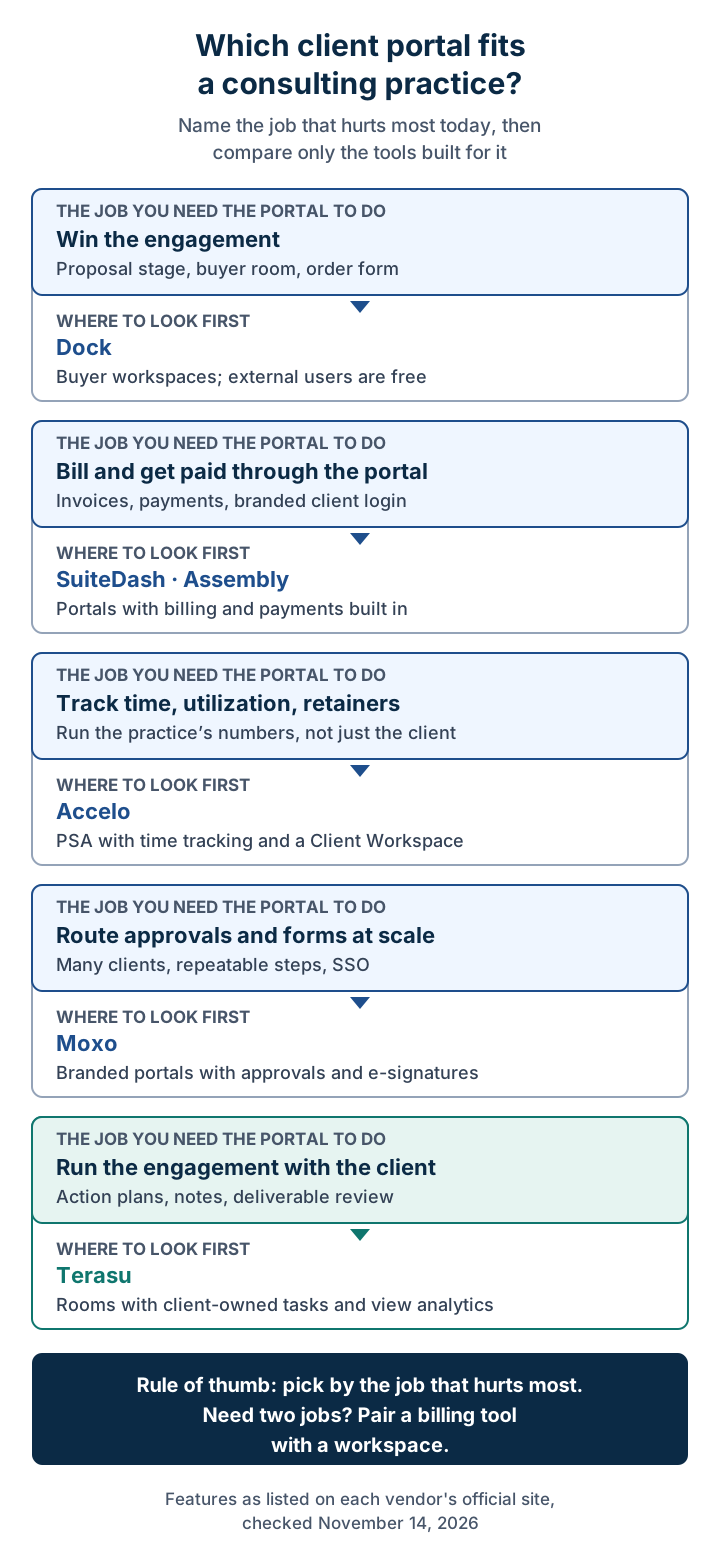
The same routing in text form, with the section to read next:
| The job you need done | Where to look first | Read next |
|---|---|---|
| Win the engagement (proposal stage) | Dock | Dock |
| Bill and get paid through the portal | SuiteDash · Assembly | SuiteDash and Assembly |
| Track time, utilization, and retainers | Accelo | Accelo |
| Route approvals and forms across many clients | Moxo | Moxo |
| Run the engagement with the client | Terasu | Terasu |
If two rows apply, do not force one tool to cover both. A small practice that invoices through its accounting software usually does not need billing in the portal at all. A firm that already tracks time in a professional services tool may only need a place to run the work with the client.
Want one place where your team and the client see the same action plan?
Start freeHow we compared these tools
We opened each vendor's own website and pricing page on November 14, 2026, and recorded only what those pages say. We did not use review-site ratings, and we did not sign up for paid plans. When a page did not mention a feature, the table says "not listed" rather than "no", because the feature may exist on a page we did not check.
We compared seven points that map to the engagement moments above:
- Client-side task owners: can a task be assigned to a person at the client, with a due date?
- Meeting notes and decisions: is there a place in the project for notes and decisions?
- Document view analytics: can you see who opened a shared proposal or deliverable?
- Billing and payments: can the client pay invoices through the portal?
- Time tracking: can you log hours against the engagement?
- Access control: how do you keep material internal, and what security controls are listed?
- Published pricing: is the price on the official page, and what is the entry point?
Comparison table
| Tool | Type | Client-side task owners | Notes and decisions | View analytics | Billing and payments | Time tracking | Access control (as listed) | Pricing (official page, Nov 14, 2026) |
|---|---|---|---|---|---|---|---|---|
| Assembly | Client portal + CRM + app builder | Not listed | Not listed | Not listed | Yes, on every plan including Free | Not listed | Client access permissions, audit log, enforced MFA on Advanced; custom SSO on Enterprise | Free ($0, 5 active contacts); Starter $29/mo billed annually or $49 monthly |
| SuiteDash | All-in-one business portal | Project management listed; task dependencies on Pinnacle | Not listed | Not listed | Billing, payments, and subscriptions listed | Not listed | White labeling on every plan | $19 / $49 / $99 per month; unlimited clients and staff; 30-day trial |
| Accelo | Professional services (PSA) software | Projects listed; client-side owners not described | Not listed | Not listed | Project financials; invoicing not named on the homepage | Yes | "Client Workspace" listed, not described | Not published; custom quote |
| Moxo | Branded portals for workflows | Approvals, reviews, form fills, and decisions as action steps | Decisions as action steps | Not listed | Not listed | Not listed | SAML SSO, role-based access; magic-link access for external participants | Not published on its pricing page; request a trial or demo |
| Dock | Buyer and customer workspaces | Mutual action plan shown in a sample room | Not listed | Activity notifications on rooms and content | Order forms (CPQ); no billing listed | Not listed | Custom domain on Enterprise | Free; Standard $350/mo (5 users on the plan card); Premium $1,000/mo billed annually (10 users on the plan card); confirm seats with Dock |
| Terasu | Shared workspace per client project | Yes, tasks for both sides with owners and due dates | Meeting pages, a decision timeline (team-only), AI answers with sources (Solo and Business) | Per-viewer, per-page reading time for PDFs | No | No | Room-level and role-based access; per-page client visibility; 2FA and IP limits can apply to external participants; SSO and audit logs on Enterprise | Free ($0); Solo $35/mo; Starter $69/mo; Business $199/mo; 14-day trial |
Read the billing and time-tracking columns first. They split the list in two. If your client must pay through the portal, or you need hours against the engagement, the engagement-first tools (Terasu, Dock) will not do that job, and you will need SuiteDash, Assembly, Accelo, or your existing accounting and time tools alongside them.
Six client portal options for consultants
Assembly: a client portal with billing and a CRM
On its pricing page, Assembly describes a platform that combines a CRM, a client experience (the client portal), an app builder, and messaging, with "Billing and payments" listed on every plan, including Free. Plans are counted by active contacts and internal users:
- Free: $0, 5 active contacts, 1 internal user.
- Starter: $29 a month billed annually, or $49 billed monthly (stated in the page's FAQ), with 50 active contacts and 1 internal user.
- Professional: 500 active contacts and 3 internal users, adding custom domains, API access, and removal of the Assembly badge.
- Advanced: unlimited contacts and 5 internal users, adding client access permissions, an audit log, enforced MFA, and a HIPAA BAA.
- Enterprise: custom SSO and advanced security controls.
The page says there are "no per-client charges", but payment processing fees apply when you collect payments through Assembly. The page does not show a clear price for Professional and Advanced; check it there.
Choose Assembly if you want clients to log in, message you, and pay invoices in one branded place, and you are a solo consultant or small firm. Look elsewhere if your main problem is client-side follow-through on an action plan: the pricing page does not list tasks, meeting notes, or document view analytics.
SuiteDash: an all-in-one portal with unlimited clients
SuiteDash's pricing page lists three plans with a footnote that every plan includes unlimited clients and staff:
- Start: $19 a month, or $180 a year.
- Thrive: $49 a month, or $480 a year. Adds a proposals toolkit, deal pipelines, and client-side live chat.
- Pinnacle: $99 a month, or $960 a year. Adds onboarding flows, a learning management system, support tickets, and task dependencies.
The page's general feature grid also lists billing and packages, payments and subscriptions, contracts and e-signature, project management, and scheduling, without saying which plan includes each. Time tracking is not listed. SuiteDash offers a 30-day free trial on Pinnacle with no credit card.
Choose SuiteDash if you want one low-cost, white-labeled tool for proposals, contracts, invoices, and a client login, and you are comfortable configuring a broad product. Look elsewhere if you want a narrow tool your client can understand in five minutes; a product this broad takes setup time before the first engagement runs on it.
Accelo: professional services software with time tracking
Accelo's homepage calls it "AI-Powered PSA Software for Professional Services" and says it connects project management, resources, time tracking, and financials. Consulting is one of the six industries it names, and it says you can run fixed-fee projects and ongoing retainers side by side. It lists a "Client Workspace" in its navigation and integrations with HubSpot, Salesforce, Xero, QuickBooks Online, Jira, and Microsoft 365.
Accelo's pricing page does not publish prices. It says pricing depends on team size and growth goals, and asks you to request a custom quote.
Choose Accelo if the pain is inside your firm: utilization, margins on fixed-fee work, retainers, and forecasting. Look elsewhere if you are a one- or two-person practice, or if the problem is the client's side of the work; the homepage does not describe what the client sees in its Client Workspace, so ask for a demo of that view specifically.
Moxo: branded portals for approval-heavy workflows
On its pricing page, Moxo describes branded portals for teams, customers, and partners, with magic-link access so external participants do not need accounts or downloads. Its workflows are built from human action steps such as approvals, e-signatures, reviews, form fills, data collection, decisions, acknowledgements, and time bookings. Security items listed include SAML SSO and role-based access.
The pricing page does not show plans or prices. It offers "Request free trial" and "Book a demo" instead.
Choose Moxo if you run the same structured process with many clients, such as an onboarding sequence, a document collection step, or a sign-off chain, and your clients' IT teams expect SSO. Look elsewhere if each engagement is different and the work is mostly discussion, notes, and evolving action plans; a workflow tool shines when the steps repeat.
Dock: a buyer workspace for the proposal stage
Dock's homepage calls the product "AI Revenue Enablement" and describes buyer workspaces, sales content, and team training. Its sample deal room includes a mutual action plan, and customer onboarding is a stated use case. You can be notified when buyers engage with rooms and content.
Per Dock's pricing page, checked November 14, 2026:
- Free: $0.
- Standard: $350 a month, 5 users on the plan card, with Salesforce and HubSpot integrations.
- Premium: $1,000 a month billed annually, 10 users on the plan card.
- External collaborators, including clients, have free access.
The comparison table lower on the same page shows higher user counts than the plan cards, so confirm seats with Dock.
Choose Dock if your practice sells larger engagements through a structured sales process and you want one room per opportunity, then reuse it for onboarding. Look elsewhere if you need a workspace for the months of delivery after the contract; Dock's pages focus on revenue teams. For a comparison with another room tool, see Dock vs Aligned.
Terasu: a shared workspace for running the engagement
Terasu is our product, so read this section with that in mind. Its consulting use case page describes the job it is built for: "Turn a proposal into actions with owners and due dates", by sharing proposals, meeting notes, and action plans with the client and keeping both sides' tasks and decisions together.
What it includes, per Terasu's homepage, tasks page, view analytics page, stakeholder map page, security page, and pricing page:
- One Room per engagement. Files, meeting pages, messages, and tasks live in the same Room, which your team and the client both use.
- Tasks owned by either side. Tasks have owners and due dates, can be assigned to people at the client, and switch between board, list, and Gantt views with dependencies. Internal-only tasks are supported. Task management is on every plan, including Free.
- Meeting notes that become tasks. With the Zoom integration and cloud recording on, the transcript is saved to the Room after the call. Pasted minutes become task candidates; nothing is added until you confirm it.
- Decisions you can find later. Decisions appear on a decision timeline with their dates and original records. The timeline is visible to your team only.
- AI answers with sources (Solo and Business plans). Ask a question and the answer points to the exact part of the minutes or messages it came from, and says so when it does not know.
- Deliverable review you can see. For PDFs, Terasu records who viewed each page and for how many seconds. Video is measured in 10-second segments. Detailed analytics start on the Solo plan.
- Confidentiality inside one Room. You choose, page by page, what the client sees and what stays internal. Room-level and role-based access are listed, and workspace owners can require two-factor authentication and IP restrictions for external participants as well as their own team.
- An internal stakeholder map. Map the client's people by role, influence, and sentiment, up to 100 people per Room. The map is internal only and never shown to client members. It is available on Solo, Business, and Enterprise.
- Clients are not billed seats. Invited clients enter a name and password from the invitation email and do not count toward your seats. Shared file links need no account.
Pricing on the official page (monthly billing): Free at $0 for up to 2 users and 3 Rooms; Solo at $35 a month for 1 seat; Starter at $69 a month including 3 users (+$15 per extra user); Business at $199 a month including 10 users (+$19 per extra user); Enterprise on request. New sign-ups get every Business feature free for 14 days with no credit card. Paid plans are billed monthly in US dollars (product page).
Where Terasu is weaker, and what to use instead:
- No invoicing or payments. Clients cannot pay you inside Terasu. Keep your accounting tool, or use SuiteDash or Assembly if in-portal payment matters.
- No time tracking. Terasu does not log hours. If you bill hourly or manage utilization, you still need a time or PSA tool such as Accelo.
- No e-signature. Engagement letters and statements of work need a separate signing tool.
- Enterprise-grade controls sit on the top plan. SSO and audit logs are Enterprise only, and the security page does not list third-party certifications such as SOC 2. If your client's procurement requires them, raise it before you invite their team.
- Plan limits matter for consulting. The Free plan allows 10 tasks per Room, and the stakeholder map is not on Free or Starter, so a firm that relies on stakeholder mapping should compare Solo or Business.
Choose Terasu if your engagements stall on client-side follow-through and lost decisions, and you want the proposal, action plan, meeting notes, and deliverable review in one place your client also uses. Choose something else if the job you need is billing, time tracking, or a repeatable approval workflow across hundreds of clients.
Run your next engagement in one shared Room
Share the proposal, assign actions to owners on both sides, keep meeting notes and decisions together, and see which pages of a deliverable the client read. Free plan available; 14-day trial of every Business feature, no credit card.
Start freeHow to set up a client portal for one engagement
Whatever tool you pick, run one engagement through it before you move the whole practice. The order below follows the engagement, so the client meets the portal at a moment when it helps them, not as an extra login.
- Share the proposal in the portal, not as an attachment. You learn who on the client side opened it, and the client gets a link they can forward. Read the page-level data before the follow-up call: a sponsor who read the pricing page twice has a different question from one who stopped at the approach.
- Turn the kickoff requests into tasks. Every data request, interview slot, and system access request becomes one task with a named owner at the client and a due date. "Finance team to send last three years of cost data" is not a task; "Maria Chen sends cost data by March 6" is.
- Publish one action plan both sides can edit. List milestones, owners on both sides, and the decision each milestone feeds. Our mutual action plan template and action plan templates give copy-paste starting points.
- Store notes and decisions after every steering meeting. Write down what was decided, by whom, and what changed in the plan, on the same day. An AI meeting minutes tool can draft the notes, but a person should confirm the decisions.
- Map the client's stakeholders, and keep the map internal. Note who sponsors the work, who must approve the recommendation, and who is likely to resist it. Use our stakeholder mapping guide for the method, and check that your portal keeps this view away from client members.
- Review deliverables in one place. Share the current version only, ask for comments there, and check who actually opened it before the review meeting. For larger accounts with several engagements, an account plan keeps the longer relationship in view.
Confidentiality checklist before you invite the client
Consulting work carries client data and internal judgement in the same project. Before you send the first invitation, check these points in whichever tool you chose:
- Internal-only material is separated. Your stakeholder assessment, pricing notes, and draft recommendations sit in a place the client cannot open, inside the same project if the tool allows it.
- Each client invitee has the right access. Invite named people, not a shared team address, so you can remove one person when they leave the project.
- Shared links have the settings you expect. If you share single files by link, check who can open them and whether the viewer is told that views are recorded.
- Security controls match the client's requirements. If the client asks for SSO, audit logs, MFA, or a certification report, confirm which plan includes it before the engagement starts, not during procurement.
- Test with non-confidential material first. Terasu's own consulting page recommends this: run the first Room with sample material and check permissions before sharing client data.
- You know how the project ends. Decide what happens to the portal after the final deliverable: archived, handed over, or deleted, and tell the client.
When you don't need a client portal yet
A portal adds a login for your client, and that has a cost. You may be better off without one if:
- You run one or two engagements at a time and the client contact is a single person. A shared folder plus a clear weekly email can be enough.
- Your client mandates its own tools. Large clients often require their own SharePoint or Teams environment. In that case, keep your internal plan in your own tool and work in theirs.
- The engagement is a short, fixed deliverable with no client-side tasks, such as a two-week audit delivered as one report.
If you already use Notion or Google Drive for client work and are wondering when that breaks, read where Notion breaks for client-facing work and the hidden risks of sharing through Google Drive.
Frequently Asked Questions
What is a client portal for consultants?
It is a private, shared space where a consulting firm and its client work on one engagement: the proposal, kickoff requests, action plan, meeting notes and decisions, and deliverables. A good one shows who owns each next step on both sides and keeps internal material away from the client.
What is the best client portal software for a small consulting firm?
It depends on the job. For invoicing and payments inside the portal, compare SuiteDash and Assembly. For time tracking and retainers, look at Accelo. For running the engagement with client-owned actions, notes, and deliverable review, look at Terasu, which has a free plan and a $35 Solo plan as of November 2026.
How is a consulting client portal different from an agency client portal?
Agency portals center on asset collection, creative approvals, and production retainers. Consulting portals center on decisions and client-side ownership: action plans with owners at the client, steering meeting notes, deliverable review, and an internal stakeholder map of who will approve or resist the recommendation.
Do clients have to pay for a seat in a client portal?
Usually not, but check each vendor. Dock gives external collaborators free access, Assembly says it has no per-client charges, SuiteDash includes unlimited clients on every plan, and Terasu does not count invited clients toward seats. Payment processing fees can still apply when clients pay through a portal.
Can I keep some project material hidden from the client?
In some tools, yes. Terasu lets you choose page by page what the client sees, supports internal-only tasks, and keeps its stakeholder map and decision timeline internal. Assembly lists client access permissions on its Advanced plan. Test the setting with sample material before you share real client data.
Does Terasu handle invoicing or time tracking?
No. Terasu has no invoicing, payments, time tracking, or e-signature. It covers the shared engagement: tasks for both sides, meeting notes, decisions, files with view analytics, and AI answers with sources on Solo and Business. Keep your accounting and time tools alongside it, or choose a billing-first portal.
Conclusion
The right client portal for a consulting practice is the one that removes the step where your engagements stall. If clients pay late or you chase invoices, a billing-first portal such as SuiteDash or Assembly is the fix. If the problem is margins and utilization, a PSA tool such as Accelo is. If you repeat the same approval steps across many clients, Moxo fits, and if the struggle is winning the work, Dock does. If engagements stall because client-side actions have no owner and decisions get lost between steering meetings, a shared engagement workspace such as Terasu is the closest match, paired with your existing tools for billing, time, and signatures.
Further reading:
- Client portals for agencies
- What is consulting sales?
- Mutual action plan template
- Stakeholder mapping for B2B
- Account plan guide
Sources (all checked November 14, 2026): Assembly pricing, SuiteDash pricing, Accelo homepage, Accelo pricing, Moxo pricing, Dock homepage, Dock pricing, Terasu consulting use case, Terasu tasks, Terasu view analytics, Terasu stakeholder map, Terasu security, Terasu pricing.
Further reading
- What Is Consulting Sales? Differences from Solution Selling, the Process, and Required Skills [2026 Guide]
- Mutual Action Plan Template: 3 Copy-Paste Examples (SaaS, Enterprise, SMB) 2026
- Stakeholder Mapping for B2B Sales: Free Template + Filled-In Example (2026)
- 8 Action Plan Templates (Free Copy-Paste) + How to Write One in 5 Steps
- What Is an Account Plan? 5-Step Playbook, Filled-In Template & ABM Alignment (2026)
- AI Meeting Minutes: How It Works, How to Choose, and Sales Use Cases (2026)