8 GetAccept Alternatives & Competitors (2026): E-Signature, Proposals, or Deal Rooms
GetAccept is a sales platform that combines e-signature, proposals and quotes, and a digital sales room with mutual action plans, plus CPQ on its Enterprise tier. Because it does several jobs, there is no single "best" GetAccept alternative. The right replacement depends on which of those jobs your team actually pays GetAccept for.
Quick answer: for contracts and e-signature, look at Oneflow or PandaDoc. For proposals and quotes, PandaDoc, Proposify, or Qwilr. For a deal room with mutual action plans, Aligned, Dock, Accord, or Terasu. Need all three in one tool? Stay on GetAccept or try PandaDoc Business.
Key takeaways:
- Start with the job, not the vendor. Teams that mostly sign contracts should look at Oneflow or PandaDoc. Teams that mostly send proposals and quotes should look at PandaDoc, Proposify, or Qwilr. Teams that use GetAccept for the buyer-facing room and mutual action plans should look at Aligned, Dock, Accord, or Terasu.
- GetAccept's room features are not on its entry tier. Per GetAccept's pricing page (checked October 2026), mutual action plans and the digital sales room start on the Professional tier, which has a 5-user minimum. The eSign tier is built around signing.
- Almost every switch involves a trade-off on signing. Of the room-first tools in this guide, only Dock lets buyers sign inside the tool, and only on its order forms. If contracts of every kind must be signed in the same tool as your buyer room, staying on GetAccept or moving to PandaDoc's Business plan (which lists deal rooms) are the realistic options.
- We do not quote other vendors' prices. Plans change often. Each tool below links to its own pricing page and notes whether prices are published or available only on request.
Which GetAccept alternative fits depends on what you use GetAccept for
Most "GetAccept alternatives" lists are written by one of the vendors on the list, and they tend to put their own product first. That makes them hard to use if you are not sure which kind of tool you need. The faster route is to name the one job that would hurt most if it disappeared tomorrow, and then compare only the tools built for that job.
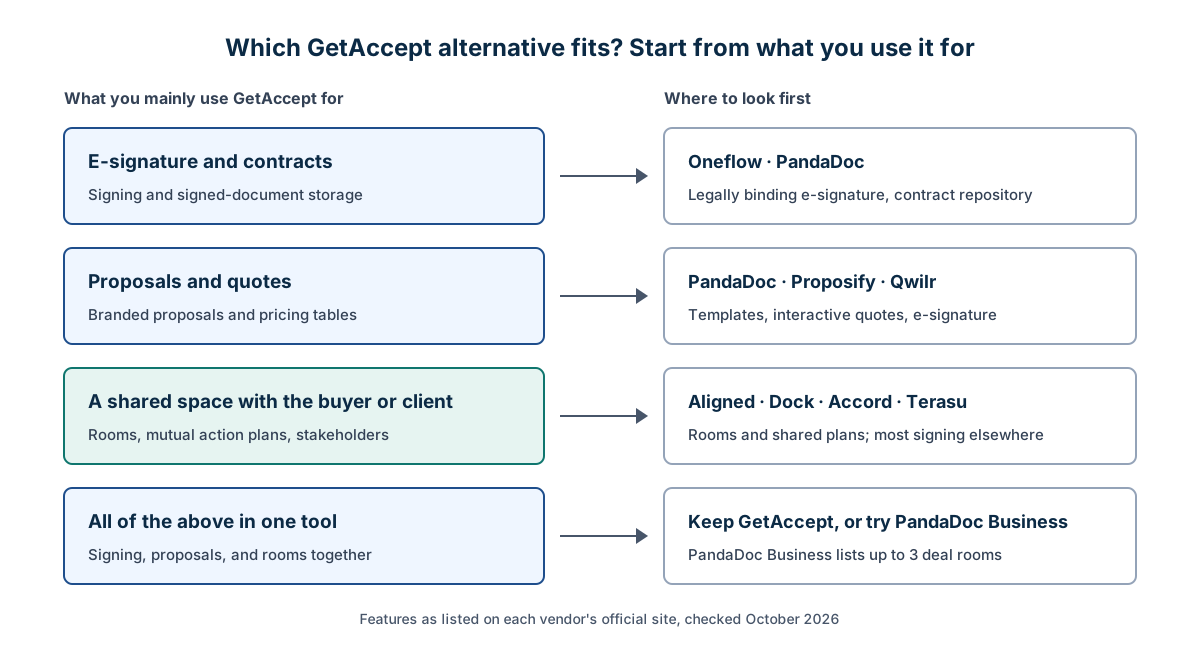
The table below is the same routing in text form, with the section of this guide to read next.
| What you mainly use GetAccept for | Where to look first | Read next |
|---|---|---|
| E-signature and contracts | Oneflow · PandaDoc | Tools for signing and proposals |
| Proposals and quotes | PandaDoc · Proposify · Qwilr | Tools for signing and proposals |
| A shared space with the buyer or client | Aligned · Dock · Accord · Terasu | Tools for a shared buyer space |
| All of the above in one tool | Keep GetAccept, or try PandaDoc Business | Comparison table and FAQ |
If you are not sure which row you are in, look at how your team used GetAccept last quarter. If most documents went out to be signed and came back signed, you are in the first row. If reps spent most of their time building and editing proposals, you are in the second. If buyers kept coming back to the same room to check next steps, open new materials, and see who owns what, you are in the third, and an e-signature tool will feel like a step backwards.
Manage client projects more efficiently. Try it free.
Need a shared space where your team and the client see the same plan?What GetAccept does, and where teams outgrow it
On its homepage, GetAccept describes itself as an AI platform for digital sales rooms and deal workflows. The product areas it lists are:
- Digital sales room: one shared space per deal, holding stakeholders, content, and timelines from opportunity to signature.
- Proposals and quotes: branded documents built from templates.
- E-signature: with support for advanced and qualified electronic signature types (AdES/QES) and eIDAS compliance, which matters for teams selling in the EU.
- Mutual action plans: a shared plan of steps between the seller and the buyer.
- Contract management and CPQ (configure, price, quote).
- Tracking and analytics: real-time insight into what buyers open.
- Integrations: CRMs such as Salesforce, HubSpot, and Pipedrive, an eSign API, webhooks, and an MCP server.
The pricing page splits these across three tiers. As of October 2026:
| GetAccept tier | What it adds | Pricing published? |
|---|---|---|
| eSign | Unlimited e-signature | Yes |
| Professional | Digital sales room and mutual action plans; 5-user minimum | Yes |
| Enterprise | CPQ and premium CRM integrations included | No, contact sales |
On Professional, premium CRM integrations are listed as add-ons. The page also contains a "Max. 5 users" line in its comparison table that conflicts with an "Unlimited users" line, so confirm seat rules with GetAccept directly before you compare costs.
Teams usually start looking for an alternative for one of four reasons:
- They only use part of the product. A team that mostly signs contracts may not need rooms. A team that lives in rooms may never send a GetAccept signature.
- The 5-user minimum on Professional doesn't fit. A two-person team that wants mutual action plans still has to meet the minimum.
- CRM depth. Premium CRM integrations are add-ons below Enterprise, so teams that want deep Salesforce or HubSpot sync compare that cost against tools that include it.
- The buyer side has outgrown "deal" tooling. After the contract, the same client may need onboarding, deliverables, and approvals in one place. Some teams find a room built for closing deals is less suited to running the project that follows.
How we compared these tools
We opened each vendor's own pricing page and product page in October 2026 and recorded only what those pages state. We then sorted the tools into three groups by their main job: signing and contracts, proposals and quotes, and buyer rooms. We did not use review-site ratings.
We compared six points:
- Buyer room: a shared, buyer-facing space with content and updates.
- Mutual action plan: a shared plan of steps and owners, visible to both sides.
- View analytics: whether you can see who opened what.
- E-signature: whether signing is built in, or handled through an integration.
- CRM integration: which CRMs are named, and on which plan.
- Free option: a free plan, a free trial, or neither.
For pricing, we record only whether prices are published or available on request. We do not list amounts, because plans and prices change often and the official page is the only reliable source.
Comparison table
| Tool | Buyer room | Mutual action plan | View analytics | E-signature | CRM integration | Free option | Pricing published? |
|---|---|---|---|---|---|---|---|
| GetAccept | Yes (Professional+) | Yes (Professional+) | Yes | Built in, all tiers | Salesforce, HubSpot, Pipedrive (premium as add-on below Enterprise) | Free trial link; no free plan listed | eSign and Professional yes; Enterprise on request |
| PandaDoc | Deal rooms on Business (up to 3) and Enterprise | Not listed | Recipient analytics on Business+ | Built in, all plans | HubSpot, Salesforce (add-on), Pipedrive, monday.com | Free plan; 14-day trial of Starter | Yes, except Enterprise |
| Proposify | Not listed | Not listed | Opens and time per section | Built in, all plans | "Popular CRMs" and Zapier; Salesforce as premium add-on | 14-day free trial | Yes |
| Qwilr | Not listed as a plan feature | Not listed as a plan feature | Yes, history length by plan | Built in from Starter | HubSpot, Zoho, Pipedrive; Dynamics on Growth; Salesforce on Scale | 14-day free trial | Yes |
| Oneflow | No dedicated room | Not listed | Not listed | Built in; extra signing methods as add-ons | Salesforce, HubSpot, Dynamics 365, Pipedrive | 14-day trial; freemium mentioned | Plans public; prices via demo |
| Aligned | Yes, free plan included | Yes, free plan included | Room analytics and heatmap on all plans | Through PandaDoc integration (Pro+) | Salesforce and HubSpot (full two-way sync on Enterprise); Close; Dynamics | Free plan | Yes, except Enterprise |
| Dock | Yes (workspaces) | Listed as a feature | Not listed on pricing page; homepage shows view notifications | Buyers can sign order forms in Dock; no general e-signature listed | Salesforce and HubSpot on paid plans | Free plan | Yes |
| Accord | Listed in product navigation | Yes | Reporting listed | Not mentioned | Salesforce and HubSpot, two-way | No free plan | Starting prices plus a platform fee |
| Terasu | Yes (Rooms) | Yes | Per-viewer, per-page detail | Not included | Salesforce and HubSpot (Business+) | Free plan; 14-day trial | Yes |
Read the e-signature column first. Only the signing and proposal tools (GetAccept, PandaDoc, Proposify, Qwilr, Oneflow) list general built-in e-signature. Among the room-first tools, Dock lets buyers sign its order forms, Aligned connects to PandaDoc, and the rest leave signing to a separate product. If every contract has to be signed in the same tool as your buyer room, that narrows the list to GetAccept or PandaDoc Business.
If you mainly need e-signature and proposals
PandaDoc: the broadest overlap with GetAccept
PandaDoc's pricing page lists four plans: Free, Starter, Business, and Enterprise. E-signature is included on every plan, including Free. Templates are capped at 5 on Free and Starter. Custom quotes and pricing tables, recipient analytics, CRM integrations, and deal rooms (up to 3) start on Business. Enterprise lifts the room cap and offers CPQ as an optional add-on. Named CRMs are HubSpot, Salesforce (a paid add-on on Business and Enterprise), Pipedrive, and monday.com.
Choose PandaDoc instead of GetAccept if you want one tool that still covers signing, proposals, and a light version of buyer rooms. Look elsewhere if rooms and mutual action plans are your main use, because PandaDoc's room feature is capped on Business and mutual action plans are not listed on its pricing page.
Proposify: proposal building first
Proposify's pricing page offers a 14-day free trial with no credit card and no permanent free plan. Every plan includes e-signature and unlimited templates. Document analytics show when each recipient opens a proposal and how long they spend in each section. Interactive quoting lets buyers pick optional items or set quantities. The page names Salesforce as a premium add-on and otherwise refers to "popular CRMs" and Zapier. There is no buyer room: collaborator seats are for your internal team, not the buyer.
Choose Proposify if your team's main work is writing and pricing proposals and you want section-level reading data. Skip it if you need buyers to return to a shared space after the proposal is signed.
Qwilr: interactive, web-page style proposals
Qwilr's pricing page lists Starter, Growth, and Scale, with a 14-day free trial of Starter. E-signature and analytics are included from Starter, with analytics history lasting 60 days on Starter, 120 days on Growth, and with no limit on Scale. CRM integrations step up by plan: HubSpot, Zoho, and Pipedrive on Starter, Microsoft Dynamics on Growth, and Salesforce on Scale. Qwilr has use-case pages about digital sales rooms and mutual action plans, but the pricing page does not list them as plan features.
Choose Qwilr if you want proposals that look like web pages, with quotes the buyer can adjust. Check the plan carefully if you run Salesforce, because that integration sits on the top tier.
Oneflow: contracts as the main job
Oneflow's pricing page lists Business and Enterprise plans and a 14-day trial; its FAQ also mentions a freemium plan without details. Both plans include legally binding e-signature, contracts you can edit live with comments and approval workflows, and contract management (folders, tags, a contract calendar, lifecycle rules). Handwritten signatures are included, while SMS and eID signing are paid add-ons. Named CRMs are Salesforce, HubSpot, Microsoft Dynamics 365, and Pipedrive. Plans are public, but prices come through a demo request.
Choose Oneflow if you mainly used GetAccept to sign and store contracts and want stronger contract management. Skip it if you need a buyer room or mutual action plans; Oneflow does not list either.
If you need a shared space with buyers
These tools treat the buyer room as the product. All four let your team and the buyer see the same materials and plan. None of them lists general built-in e-signature on its pricing page; Dock is the partial exception, because buyers can sign its order forms. If you pick one, plan to keep a separate signing tool for other contracts.
Aligned: rooms and mutual action plans on a free plan
Aligned's pricing page lists Starter (free), Basic, Pro, and Enterprise. The free Starter plan includes mutual action plans, a stakeholder map, up to 4 active rooms per seat, unlimited buyer stakeholders who don't use a seat, room analytics with a visitor heatmap, password-protected sharing, and a video recorder. Basic adds unlimited rooms, a task manager, and engagement analysis. Pro adds AI features and a PandaDoc integration for e-signature. Salesforce and HubSpot connections are limited below Enterprise, which adds full two-way sync.
Choose Aligned instead of GetAccept if you want mutual action plans and stakeholder mapping without a 5-user minimum, and you are fine handling signatures through PandaDoc or another tool.
Dock: rooms, content, and onboarding in one place
Dock's pricing page lists Free, Standard, Premium, and Enterprise. The Free plan includes 10 workspaces, and paid plans include unlimited workspaces. External collaborators such as prospects, clients, and partners use Dock for free on every plan; you pay only for your own team. Mutual action plans are listed as a feature, and order forms are included on all plans (1 on Free). Salesforce and HubSpot integrations start on Standard. The pricing page does not list general e-signature, but Dock's order forms page says buyers can review and sign order forms in Dock, with a signing order and the signed copy kept in the customer workspace. On its homepage, Dock also lists customer onboarding and client portals, so the same tool can carry a deal into the work after signature.
Choose Dock instead of GetAccept if many people on the buyer side need access and you want buyer seats to cost nothing, or if you want sales rooms and onboarding portals in one tool.
For a closer look at these two, see our Dock vs Aligned comparison.
Accord: mutual action plans tied to CRM process
Accord's pricing page lists Starter, Growth, and Enterprise, with no free plan. Starter and Growth show per-user starting prices plus a platform fee; Enterprise is custom. Mutual action plans and stakeholder management are listed, and the FAQ says the sync with Salesforce and HubSpot runs both ways. Accord's homepage describes the product as an AI layer for revenue execution, built around playbooks, account planning, and business cases.
Choose Accord instead of GetAccept if your priority is a repeatable sales process enforced through your CRM, and buyer rooms are one part of that process rather than the center of it.
Terasu: one shared workspace from the proposal into the client project
Terasu is a client work OS: a shared workspace where your team and the client see the same documents, tasks, and updates for each client project. Its tagline is "Every client project, in plain sight." It fits teams whose work with a client continues after the signature, such as agencies, consultancies, and implementation teams.
What it includes, per Terasu's product page and pricing page:
- Rooms. One shared workspace per client project, where both sides see the same documents, tasks, and updates.
- Document view analytics. See who opened a shared document, which pages they read, and for how long, down to per-viewer, per-page detail. Detailed analytics start on the Solo plan.
- Mutual action plans. Tasks assigned to both your team and the client, so next steps are visible to everyone instead of living in one person's inbox. See our mutual action plan guide for how to set one up.
- Stakeholder Map. A visual map of the client's people with each person's role, influence, and stance. Available from the Solo plan.
- Messaging in context, with @mentions inside each Room.
- AI agent drafts with approval. Agents draft replies, summaries, and follow-ups from Room activity, and every draft waits for a person to approve it before it is sent.
- CRM integration with Salesforce and HubSpot on the Business plan and above.
- Japanese and English. The product interface is available in both languages.
Terasu does not include e-signature. The Free plan covers up to 2 users and 3 Rooms, paid plans include a 14-day free trial, and the Solo plan lists inviting clients to Rooms without counting them as billed seats.
Choose Terasu instead of GetAccept if you want the same shared space to carry a client from the proposal into the project that follows, or you need Japanese and English in one workspace. Keep GetAccept if legally binding e-signature inside the same tool as your buyer room is a hard requirement.
Run every client project in one shared workspace
Share documents in a Room, see who on the client side viewed what, and keep a mutual action plan both sides can see. Free plan available.
Start freeMigration checklist: moving off GetAccept
Switching is mostly about not losing three things: your templates, your signed records, and the data your CRM depends on. Work through this list before you cancel.
Before you choose
- List the GetAccept features your team used in the last 90 days. Drop anything nobody used from your requirements.
- Decide where signing will happen. If your new tool doesn't sign, pick the signing tool at the same time.
- Check whether you rely on advanced or qualified e-signatures (AdES/QES) for EU deals, and confirm the new signing tool supports the type you need.
Templates and content
- Export or copy every proposal, quote, and contract template you still use.
- Rebuild your most-used template first and send a test to a colleague before rebuilding the rest.
- Move shared sales content (case studies, security documents, product sheets) to the new tool's library or rooms.
Signed documents and open deals
- Download every signed document and its signing record from GetAccept, and store them where legal and finance can find them. Use GetAccept's help center for the current bulk-download steps.
- Let documents that are already out for signature finish in GetAccept rather than resending them.
- For open deals with an active room, tell the buyer about the new link before you move them.
CRM and reporting
- List the CRM fields GetAccept writes to, such as document status and signed date.
- Map each field to the new tool's integration, or retire it and update any reports that use it.
- Run one real deal end to end in the new setup before you switch the whole team.
Frequently Asked Questions
What are the main GetAccept competitors?
It depends on the job. For e-signature and contracts, the closest competitors are Oneflow and PandaDoc. For proposals and quotes, they are PandaDoc, Proposify, and Qwilr. For buyer rooms and mutual action plans, they are Aligned, Dock, Accord, and Terasu.
What is the best GetAccept alternative?
There isn't one answer, because GetAccept covers several jobs. Pick by the job you rely on most: PandaDoc if you want the broadest overlap, Oneflow for contracts, Proposify or Qwilr for proposals, and Aligned, Dock, Accord, or Terasu for a shared space with buyers.
GetAccept vs Dock: which should I choose?
Choose GetAccept if you need built-in e-signature in the same tool as your buyer room. Choose Dock if buyer access matters more: Dock lets external collaborators join for free on every plan, includes order forms that buyers can sign in Dock, and also covers onboarding and client portals. For contracts other than order forms, Dock does not list general e-signature.
How is GetAccept priced?
GetAccept has three tiers: eSign, Professional, and Enterprise. Prices for eSign and Professional are on its pricing page; Enterprise is by quote. Professional, which adds the digital sales room and mutual action plans, has a 5-user minimum. Check the official page for current figures.
Is there a free alternative to GetAccept?
Yes. Aligned and Dock both publish free plans with buyer rooms, and Aligned's free plan includes mutual action plans and a stakeholder map. PandaDoc has a free plan with e-signature. Terasu has a free plan for up to 2 users and 3 Rooms.
Do the room-first alternatives include e-signature like GetAccept?
Not as a general feature. As of October 2026, Aligned offers signing through a PandaDoc integration on its Pro plan and above, and Dock lets buyers sign its order forms, while Accord and Terasu do not list e-signature. For contracts beyond Dock's order forms, pair any of them with a separate signing tool.
Conclusion
GetAccept bundles signing, proposals, and buyer rooms, so the right alternative depends on which of those you actually use. If signing and contracts are the core, compare Oneflow and PandaDoc. If proposals and quotes are the core, compare PandaDoc, Proposify, and Qwilr. If the buyer room and mutual action plan are the core, compare Aligned, Dock, Accord, and Terasu, and plan a separate tool for signatures (Dock covers order forms only). Before you switch, download your signed documents, rebuild your key templates, and map your CRM fields so nothing is lost.
Further reading:
- Best digital sales room software
- Dock vs Aligned
- Recapped alternatives
- What is buyer enablement?
- Mutual action plan guide
Further reading
- Dock vs Aligned (2026): Digital Sales Room Comparison, Fact-Checked
- Recapped Alternatives (2026): Recapped Is Shutting Down — Where to Migrate
- Best Digital Sales Room Software (2026): 7 Tools Compared Fairly + Switching Guide
- What Is Buyer Enablement? Gartner's Framework, the 6 Buying Jobs & How to Implement It (2026)
- Mutual Action Plan: 7-Step Build, Buyer/Seller Matrix & DSR Workflow (2026)
- Stakeholder Map Template for B2B Sales (2026): Free Copy-Paste Framework