7 DocSend Alternatives (2026): Pick by the Job, With Current Pricing
DocSend is a document-sharing and tracking tool from Dropbox. You send a file as a link instead of an attachment, and DocSend shows who opened it, when, and how they engaged with it. Its higher plans add data rooms for fundraising and M&A. A DocSend alternative is any tool that replaces one of those jobs: tracking a shared PDF, running a data room, getting a proposal signed, or giving a client one place to work from.
Quick answer: if you mainly track pitch decks and PDFs and want a free or self-hosted option, use Papermark. If you run data rooms for a raise or due diligence, stay on DocSend Advanced Data Rooms or compare Papermark Data Rooms and Digify. If your documents need to be signed, look at PandaDoc or GetAccept. If the files belong to a deal or client project that keeps going after the link is opened, a room-based tool such as Dock or Terasu fits better than any link tracker.
Key takeaways:
- DocSend's entry plans are single-user. On DocSend's pricing page (checked November 14, 2026), Personal and Standard are each listed for 1 user. The first plan that includes 3 users is Advanced, at $150 a month billed annually or $250 billed monthly.
- There is no free DocSend plan, only a trial. DocSend offers a 14-day free trial of Advanced Data Rooms, and the page notes that the trial limits the number of viewers.
- Papermark is the closest like-for-like switch. It describes itself as "the open-source DocSend alternative" on GitHub, has a free plan with page-by-page analytics, and can be self-hosted.
- Many teams don't actually need a DocSend replacement. If the shared PDF is one step in a longer client relationship, the missing piece is usually a shared place for tasks, notes, and follow-ups, not better link tracking.
DocSend pricing in November 2026: what you would be leaving
DocSend has four self-serve plans, priced in US dollars, plus custom plans through sales. We opened DocSend's pricing page on November 14, 2026 and recorded the figures below. DocSend says annual billing saves up to 40%.
| DocSend plan | Annual billing (per month) | Monthly billing | Users included | What it adds |
|---|---|---|---|---|
| Personal | $10 | $15 | 1 | Basic sharing controls, document-level analytics, 4 e-signatures a month, unlimited viewers |
| Standard | $45 | $65 | 1 | Multi-file sharing, video analytics, file requests, custom branding, unlimited e-signatures |
| Advanced | $150 | $250 | 3 | Simple data rooms (Spaces), email verification, allow and block lists, automatic watermarks, NDA and gating agreements, screenshot protection |
| Advanced Data Rooms | $180 | $300 | 3 | Full data rooms, group permissions, due diligence tracking, data room audit log and analytics, priority email support |
A few details on the same page matter when you compare costs:
- Trial: the free trial is for Advanced Data Rooms, it lasts 14 days, and it has a viewer limit.
- Salesforce is listed as an add-on, priced through DocSend sales.
- Storage: 50 GB per user, 2 GB maximum upload, and 200 assets per data room.
- Tax: where Dropbox is registered for sales tax, tax is added automatically.
So DocSend is not expensive for one person who tracks a few decks, and it is well equipped for data rooms. The cost question shows up in between: a small team that wants shared tracking but not data rooms has to choose between single-user plans and the 3-user Advanced plan.
Why teams look for a DocSend alternative
In our reading of DocSend's own plan list, five situations push teams to look elsewhere. Each one points to a different kind of tool.
- You want a free plan, not a trial. DocSend has no free tier. If you only send a handful of decks a month, a tool with a permanent free plan covers the job.
- You want to own the software. Some teams, especially technical founders and companies with strict data rules, want to host document sharing on their own servers. DocSend is a hosted service only.
- You need data rooms but want to compare plans. Data rooms start on Advanced. Teams running one raise or one sale sometimes compare DocSend against data-room specialists with different limits on rooms, guests, and storage.
- Your document has to be signed. DocSend includes e-signature, but it is a sharing tool first. Teams whose main output is a proposal or contract that must be priced, approved, and signed often want a proposal tool.
- The document is only the start of the work. An agency sends a proposal, the client reads it, and then there is a project: files, meeting notes, approvals, and tasks on both sides. A link tracker tells you the proposal was read. It does not hold what happens next.
If you recognize yourself in reasons 1 to 3, you want a better link tracker or data room. If you are in reason 4 or 5, you want a different category of tool, and the rest of this guide sorts them out.
Which DocSend alternative fits: start from the job
The quickest way to choose is to name the one job the shared link must do, and then compare only the tools built for that job.
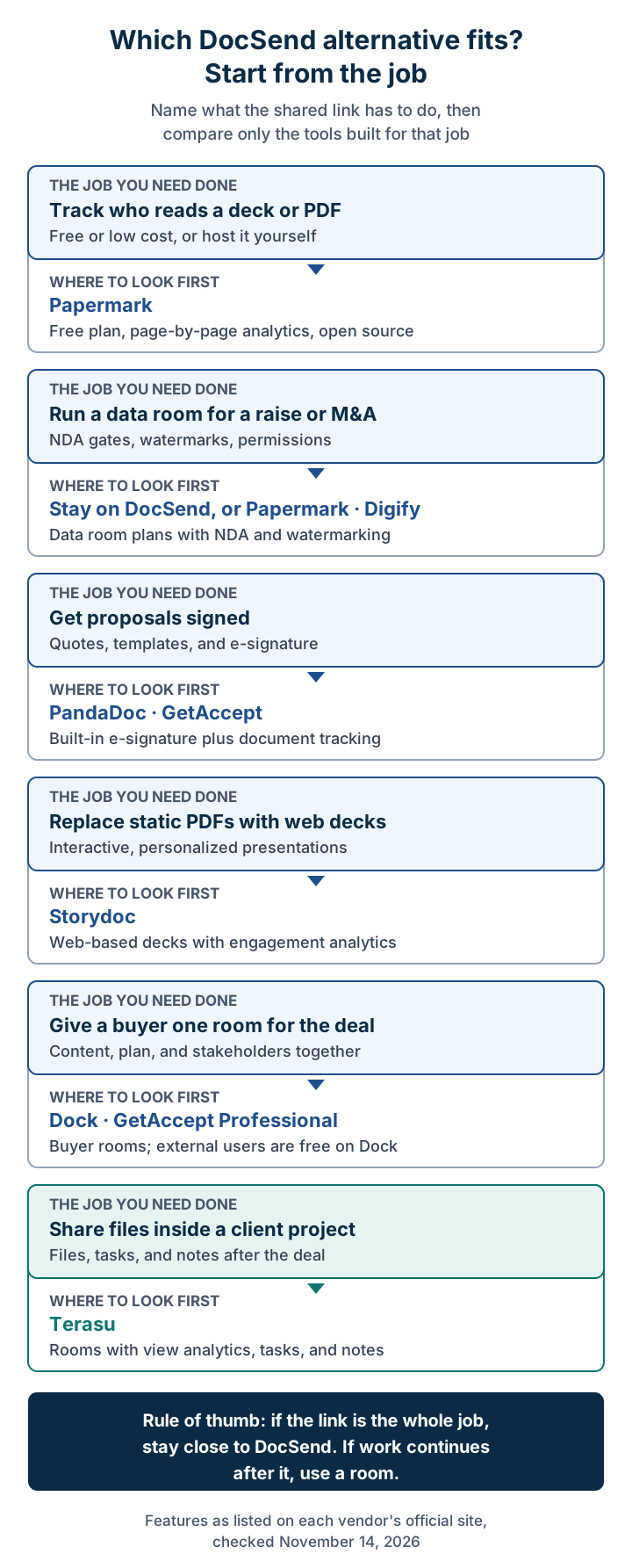
The same routing as a table, with the section to read next:
| Your situation | Where to look first | Read next |
|---|---|---|
| You track who reads a deck or PDF and want it free or self-hosted | Papermark | Papermark |
| You run a data room for fundraising or M&A | DocSend Advanced Data Rooms, Papermark, Digify | When DocSend is still the better choice |
| Your proposals and quotes need to be signed | PandaDoc, GetAccept | PandaDoc |
| You want interactive web pages instead of static PDFs | Storydoc | Storydoc |
| You want one buyer-facing room per sales deal | Dock, GetAccept Professional | Dock |
| The files belong to an ongoing client project | Terasu | Terasu |
Send a file as a share link and see whether it was opened and how far it was read, which an email attachment cannot tell you. Start with document tracking, and use a Room when you need the whole project together.
See the workflow and demoHow we compared these tools
We opened each vendor's own pricing or product page on November 14, 2026 and recorded only what those pages say. We did not use review-site ratings or third-party price lists. Where a page was unclear, we say so instead of guessing.
We compared six points:
- View analytics: whether you can see who opened a document and how far they read.
- Data rooms: a secured space for many documents with permissions, NDAs, or watermarks.
- E-signature: whether signing is built in.
- Work after the document: tasks, notes, or messages shared with the recipient.
- Free option: a permanent free plan, a free trial, or neither.
- Published pricing: whether the official page lists prices, and in which currency.
Prices below are the figures shown on each official page on that date. Plans change often, so treat them as a starting point and confirm on the vendor's page before you buy.
Comparison table
| Tool | Best for | View analytics | Data rooms | E-signature | Work after the document | Free option | Price shown on official page (Nov 14, 2026) |
|---|---|---|---|---|---|---|---|
| DocSend | Decks, fundraising, data rooms | Yes | Advanced and above | Yes (4 a month on Personal) | No | 14-day trial of Advanced Data Rooms | From $10/month billed annually, 1 user |
| Papermark | Free or self-hosted PDF tracking, data rooms | Page-by-page on every plan | Data Rooms plan and higher | Not listed | No | Free plan; 7-day trial of Data Rooms Plus | Pro €24/month billed annually (euros) |
| Digify | Security-heavy data rooms | Detailed file analytics | Every plan | Not listed | No | Free trial (length not stated) | Pro $150/month, 1 user |
| PandaDoc | Proposals and quotes that get signed | Recipient analytics on Business+ | Deal rooms on Business (up to 3) | Every plan | Light, through deal rooms | Free plan; 14-day trial | Starter $19 per seat/month billed annually |
| GetAccept | Signing plus a sales room | Document tracking listed | No (sales room on Professional) | Every tier | Mutual action plans on Professional | Free trial button (length not stated) | eSign $25 per user/month |
| Storydoc | Interactive web decks | Basic to advanced by plan | No | Listed in comparison table | No | "Create Free" sign-up; trial not stated | Starter $19.80/month billed annually |
| Dock | Buyer rooms and onboarding | Engagement tracking (homepage) | No | Order forms only | Workspaces, playbooks | Free plan | Standard $350/month (5 users on the plan card) |
| Terasu | Files inside an ongoing client project | Per viewer, seconds per PDF page (Solo+) | No | No | Tasks, notes, messages in each Room | Free plan; 14-day trial, no card | Solo $35/month, 1 seat |
Read the "Data rooms" and "Work after the document" columns together. The tools that are strong on data rooms (DocSend, Papermark, Digify) do not hold tasks or meeting notes. The tools that hold ongoing work (Dock, Terasu) do not offer NDA-gated data rooms. Pick the column that matches your job first.
Papermark: the open-source DocSend alternative
Papermark is the most direct DocSend replacement in this list. Its GitHub repository calls it "the open-source DocSend alternative," it is licensed under AGPLv3, and the README says you can host it yourself.
Plans on the official pricing page, which shows prices in euros (annual billing first, monthly billing in brackets):
| Papermark plan | Price per month | Team members | What it adds |
|---|---|---|---|
| Free | €0 | 1 | 50 links, 50 documents, unlimited visitors, page-by-page analytics |
| Pro | €24 (€29 monthly) | 1 | 100 documents, custom branding, video and large uploads |
| Business | €59 (€79 monthly) | 3 | 1,000 documents, custom domain for documents, screenshot protection |
| Data Rooms | €99 (€149 monthly) | 3 | Unlimited data rooms, NDA agreements, dynamic watermark, granular permissions, data room analytics |
| Data Rooms Plus | €249 (€349 monthly) | 5 | Data room Q&A, upload requests, audit log |
Above Data Rooms Plus, the page also lists Data Rooms Premium, Data Rooms Unlimited, and a custom Enterprise plan. The FAQ says there is a 7-day free trial of the Data Rooms Plus plan, with no credit card required. Managed self-hosting is offered under the Enterprise option.
Choose Papermark if you want DocSend-style link tracking without a monthly bill, you need a custom domain on a small team, or you want to run the software on your own servers. Skip it if your document needs to be signed, or if what you really need is a shared workspace with the recipient after they read it. If you are still deciding whether you need a tracking tool at all, our guide on how to track PDF views compares read receipts, drive viewer lists, and tracking links.
Digify: data rooms with tighter document control
Digify's pricing page is built around data rooms and document security rather than sales tracking. On November 14, 2026 it showed:
- Pro: $150 per month, 1 user, 3 data rooms, 50 data room guests, custom NDA, folder-level permissions.
- Team: $375 per month, 3 users, 10 data rooms, 200 guests, plus dynamic watermark, screenshot shield, data room Q&A, and file-level permissions.
- Business: $1,500 per month, 5 users, unlimited data rooms, 500 guests, white-label URL, SSO.
- Enterprise: custom quote.
The page also lists access revocation, file expiry, view counts, detailed file analytics, and location and IP address tracking. It offers a billing toggle with an annual saving of 30%; confirm which billing term the displayed prices refer to before you budget.
Choose Digify if document control is the priority: revoking access after a file is sent, watermarking every page, and limiting what guests can do. Skip it if you are a sales team sending one deck at a time, because the entry price is set for data room work.
PandaDoc: when the document must be signed
PandaDoc's pricing page lists four plans: Free, Starter at $19 per seat per month billed annually, Business at $49 per seat per month billed annually, and Enterprise on request. E-signature is on every plan. Recipient analytics, the content library, CRM integrations, and deal rooms (up to 3) start on Business. Templates are capped at 5 on Free and Starter. The FAQ describes a 14-day free trial.
Compared with DocSend, PandaDoc is a document builder first: you create the proposal, add a pricing table, send it, and collect a signature in the same tool. DocSend is better if you upload finished PDFs and care most about how they were read.
Choose PandaDoc if most of your shared documents are proposals, quotes, or contracts that need a signature. Skip it if you mainly share pitch decks or data rooms, where PandaDoc's room feature is capped and its strengths go unused.
For the follow-up side of proposals, see our guide to proposal follow-up emails.
GetAccept: signing and a sales room in one tool
GetAccept's pricing page shows eSign at $25 per user per month, Professional at $49 per user per month with a minimum of 5 users (billed annually), and Enterprise on request. The page lists document tracking, and Professional adds what GetAccept calls "the complete AI Digital Sales Room experience" plus mutual action plans. CRM integrations such as HubSpot and Pipedrive are available as add-ons below Enterprise.
Choose GetAccept if you want signing, document tracking, and a buyer-facing room in one product and your team has at least 5 sellers for Professional. Skip it if you only need link tracking, which costs less in DocSend or Papermark. Our GetAccept alternatives guide covers its trade-offs in more detail.
Storydoc: interactive web decks instead of PDFs
Storydoc's pricing page lists Starter at $19.80 per month billed annually ($237.60 a year) with 5 active documents and basic analytics, Pro at $36 per month billed annually ($432 a year) with 30 active documents, extended analytics, and integrations, and Teams for 5 or more users on request. Storydoc replaces the PDF itself with a web-based, interactive deck, so the reading data comes from the page rather than from a tracked file.
Choose Storydoc if you want to stop sending static PDFs and are willing to rebuild your decks in a new format. Skip it if you need to share existing PDF, Word, or spreadsheet files as they are, or need a data room.
Dock: a buyer room with free external users
Dock's pricing page lists a Free plan, Standard at $350 per month, Premium at $1,000 per month billed annually, and Enterprise on an annual contract. The plan cards list 5 users on Standard and 10 users on Premium, but the comparison table lower on the same page shows higher counts, so confirm seats with Dock. External collaborators such as prospects, clients, and partners have free access on every plan. The Free plan includes 10 workspaces, and Salesforce and HubSpot integrations start on Standard.
The pricing page does not list analytics by plan, but Dock's homepage says you can "see how reps and buyers use each asset" and get notified when buyers engage with rooms and content. Its examples also show a mutual action plan inside a deal room and onboarding playbooks.
Choose Dock if you want one room per sales deal or customer onboarding, with content, a plan, and buyer access in the same place. Skip it if you need NDA-gated data rooms or only want to track single files. For a head-to-head with another room tool, see Dock vs Aligned.
Terasu: when the document belongs to a client project
Terasu is our product, so read this section with that in mind. It is not a DocSend clone, and we would not recommend it to a founder who only needs to track a pitch deck. It is a shared workspace for client work, built for agencies, consultancies, and other teams whose relationship with the client continues after a document is read. Its tagline is "Every client project, in plain sight."
What it includes, per Terasu's homepage, view analytics page, tasks page, and pricing page:
- Rooms. One shared space per client project. Files, meeting minutes, messages, and tasks live in the same Room that your team and the client both use.
- Document view analytics. For PDFs, Terasu records who viewed each page and for how many seconds. Video is measured in 10-second segments. Detailed analytics start on the Solo plan.
- Share links for single files. Shared file links open with no account, with optional PIN, expiry, and view-only sharing.
- Tasks shared with the client. Room tasks have owners and due dates, can be assigned to people on the client side, and appear on a Gantt chart. Internal-only tasks are also supported.
- AI answers with sources (Solo and Business plans). Ask a question and the answer points to the exact part of the minutes or messages it came from.
- Clients are not billed seats. Invited clients do not count toward your seats.
Pricing on the official page: Free at $0 for up to 2 users and 3 Rooms with basic view logs; Solo at $35 per month for 1 seat; Starter at $69 per month including 3 users (+$15 per extra user); Business at $199 per month including 10 users (+$19 per extra user); Enterprise on request. Every new sign-up gets all Business features free for 14 days with no credit card. Paid plans are billed monthly in US dollars (product page).
What Terasu does not do: it has no e-signature, and it does not list DocSend-style data room features such as NDA gates, dynamic watermarking, or due diligence tracking.
Choose Terasu instead of DocSend if the proposal or deliverable you share is one part of a client project, and you want the reading data next to the tasks, notes, and decisions that follow. Stay on DocSend or use Papermark if the link itself is the whole job.
Document sharing that shows who read what, and how far.
Send a file as a share link and see whether it was opened and how far it was read, which an email attachment cannot tell you. Start with document tracking, and use a Room when you need the whole project together.
See the workflow and demoWhen DocSend is still the better choice
Switching only makes sense if the new tool is better at the job you actually do. DocSend remains the stronger choice in these cases:
- Fundraising and M&A data rooms. Advanced Data Rooms combines group permissions, due diligence tracking, an audit log, automatic file indexing, and data room analytics in one self-serve plan. Founders and advisors already know the format, which matters when investors are the audience.
- You already live in Dropbox. DocSend is a Dropbox product and lists Dropbox among its integrations, so files move without a new storage habit.
- One person, a few decks. Personal costs $10 a month billed annually and includes unlimited viewers and 4 e-signatures a month. Switching to save that amount rarely pays back the effort.
- You want signing and tracking without a proposal builder. Standard includes unlimited e-signatures on uploaded files.
And Papermark is the better choice over every other option here when you need self-hosting or a permanent free plan with page-by-page analytics.
Which to pick: a short, honest summary
| If this is you | Pick | Why not the others |
|---|---|---|
| Founder sharing a pitch deck with investors | Papermark Free, or DocSend Personal | Room and proposal tools add setup you won't use |
| Running a fundraising or M&A data room | DocSend Advanced Data Rooms, Papermark Data Rooms, or Digify | Sales rooms and project tools lack NDA gates and audit logs |
| Engineering team that must self-host | Papermark | DocSend and the rest are hosted only |
| Sales team whose proposals get signed | PandaDoc, or GetAccept with 5+ users | Link trackers don't build quotes |
| Marketing or sales team rethinking the deck format | Storydoc | Others track files rather than replace them |
| Sales team running one room per deal or onboarding | Dock | DocSend tracks files, not shared plans |
| Agency or consultancy sharing proposals and deliverables with clients | Terasu | Data rooms and deal rooms stop before the project work starts |
If you are unsure which row you are in, look at the last ten documents you sent through DocSend. Count how many ended with "read, done", how many ended with a signature, and how many turned into a project with tasks on both sides. The biggest group tells you which category to shop in. For the wider category of buyer-facing rooms, our digital sales room software comparison goes deeper.
Switching checklist: moving off DocSend
Most of the risk in a switch is losing links that are already out in the world. Work through this before you cancel.
Before you choose
- List which DocSend features you used in the last 90 days: data rooms, NDAs, e-signature, watermarks, Salesforce.
- Decide where signing will happen if your new tool has no e-signature.
- Check data residency or self-hosting requirements with whoever owns security.
Links already sent
- Export the list of active links and who has viewed them. DocSend lists exporting the people who accessed a document among its features.
- For investor or customer links that are still in use, send the new link before you turn off the old one.
- Download engagement data you may need later, such as data room activity from an active deal.
Content and team
- Move your library of current decks and one-pagers first; archive old versions instead of migrating them. Our sales collateral guide helps decide what to keep.
- Recreate custom domains and branding before you share new links.
- Run one real send end to end, including a viewer outside your company, before switching the whole team.
Frequently Asked Questions
What is the best DocSend alternative?
It depends on the job. For free or self-hosted PDF tracking, Papermark. For data rooms, DocSend Advanced Data Rooms, Papermark Data Rooms, or Digify. For proposals that need signing, PandaDoc or GetAccept. For files that belong to an ongoing client project, Terasu.
How much does DocSend cost in 2026?
On November 14, 2026, DocSend's pricing page listed Personal at $10, Standard at $45, Advanced at $150, and Advanced Data Rooms at $180 per month billed annually. Monthly billing was $15, $65, $250, and $300. Personal and Standard include 1 user; Advanced plans include 3.
Is there a free version of DocSend?
No permanent free plan is listed. DocSend offers a 14-day free trial of Advanced Data Rooms with a limit on viewers. For a free plan, Papermark offers 50 links and 50 documents with page-by-page analytics, and Terasu's free plan covers 2 users and 3 Rooms.
Is Papermark really open source?
Yes. Papermark's GitHub repository describes it as the open-source DocSend alternative, shows an AGPLv3 license, and explains how to run it yourself. Papermark also sells hosted plans, and managed self-hosting is offered under its enterprise option.
Which DocSend alternatives include e-signature?
PandaDoc and GetAccept include e-signature on every plan. Dock lets buyers sign its order forms. Papermark, Digify, and Terasu do not list built-in e-signature, so pair them with a separate signing tool if you need one. DocSend itself includes e-signature on all plans.
Can a digital sales room replace DocSend?
Partly. Rooms such as Dock and Terasu track how shared files are read and add plans, tasks, and messages around them. They do not replace DocSend's NDA-gated data rooms for fundraising or due diligence, so keep a data room tool for that work.
Conclusion
DocSend is good at one thing: sending a document as a tracked link, and at the top end, running a data room. Pick an alternative by the job, not by the feature list. Papermark is the closest match and the only self-hostable option. Digify suits security-heavy data rooms. PandaDoc and GetAccept fit when the document has to be signed. Storydoc fits when you want web decks instead of PDFs. Dock and Terasu fit when the document is the start of shared work, with Dock aimed at sales deals and onboarding and Terasu at client projects where tasks and notes continue after the proposal.
Further reading:
- GetAccept alternatives
- Best digital sales room software
- Dock vs Aligned
- Sales collateral guide
- Proposal follow-up email
- How to track PDF views
Sources (all checked November 14, 2026): DocSend pricing, Papermark pricing, Papermark on GitHub, Digify pricing, PandaDoc pricing, GetAccept pricing, Storydoc pricing, Dock pricing, Dock homepage, Terasu pricing.
Further reading
- 8 GetAccept Alternatives & Competitors (2026): E-Signature, Proposals, or Deal Rooms
- Best Digital Sales Room Software (2026): 7 Tools Compared Fairly + Switching Guide
- Dock vs Aligned (2026): Digital Sales Room Comparison, Fact-Checked
- Sales Collateral: Types, Funnel-Stage Map, and How to Measure Impact [2026]
- Proposal & Quote Follow-Up Emails: 15 Templates, Subject Lines & a Day-by-Day Cadence (2026)
- What Is a Digital Sales Room? How It Works & Why It Matters (2026)