How to Track PDF Views: Know If Someone Opened Your PDF (2026)
PDF tracking means sharing a PDF in a way that records whether it was opened, who opened it, which pages they read, for how long, and whether they came back. A PDF sent as an email attachment cannot do this. Once the file lands in someone's inbox, it is a copy on their device, and nothing reports back to you.
Quick answer: you can't find out whether someone opened a PDF you sent as an attachment. Email read receipts only tell you the email was opened, and only if the recipient's system allows it. The reliable way to track PDF views is to stop attaching the file and send a link to it instead: a view-tracking link records each open, the pages read, and the time spent on each page.
Key takeaways:
- Attachments are blind. A PDF attached to an email has no way to report back. Nothing in your email app or the PDF changes that.
- Read receipts are about the email, not the PDF, and the recipient can decline. Microsoft says there is "no way to force a recipient to send a read receipt" in Outlook. In Gmail, read receipts only work on work or school accounts.
- Drive and OneDrive viewer lists are built for colleagues. Google's Activity dashboard covers Docs, Sheets, and Slides, and you can only see it for files in your own domain. These lists aren't built to track a client reading a PDF.
- A view-tracking link is the method that works. You upload the PDF once, share a link, and see opens, pages, time per page, and return visits.
- Use the data to time and shape your follow-up, not to comment on it. "I saw you read page 4 three times" makes people feel watched. Leading with the pricing question they clearly care about does not.
Why you can't tell if someone opened your PDF attachment
When you attach a PDF to an email, the recipient's mail server stores a full copy of the file. They can open it in a browser, a desktop PDF reader, or a phone, forward it, or print it, and none of those actions sends anything back to you. Your email app only knows the message left your outbox.
That is why "how to know if someone opened my PDF" has no setting-level answer for attachments. People usually try one of three workarounds, and each one answers a smaller question than the one you are asking:
- Request a read receipt to learn whether the email was opened.
- Share the file from Google Drive or OneDrive and check the viewer list.
- Send a link through a document tracking tool that records each view of the PDF itself.
The diagram below shows what each one can see after you hit send.
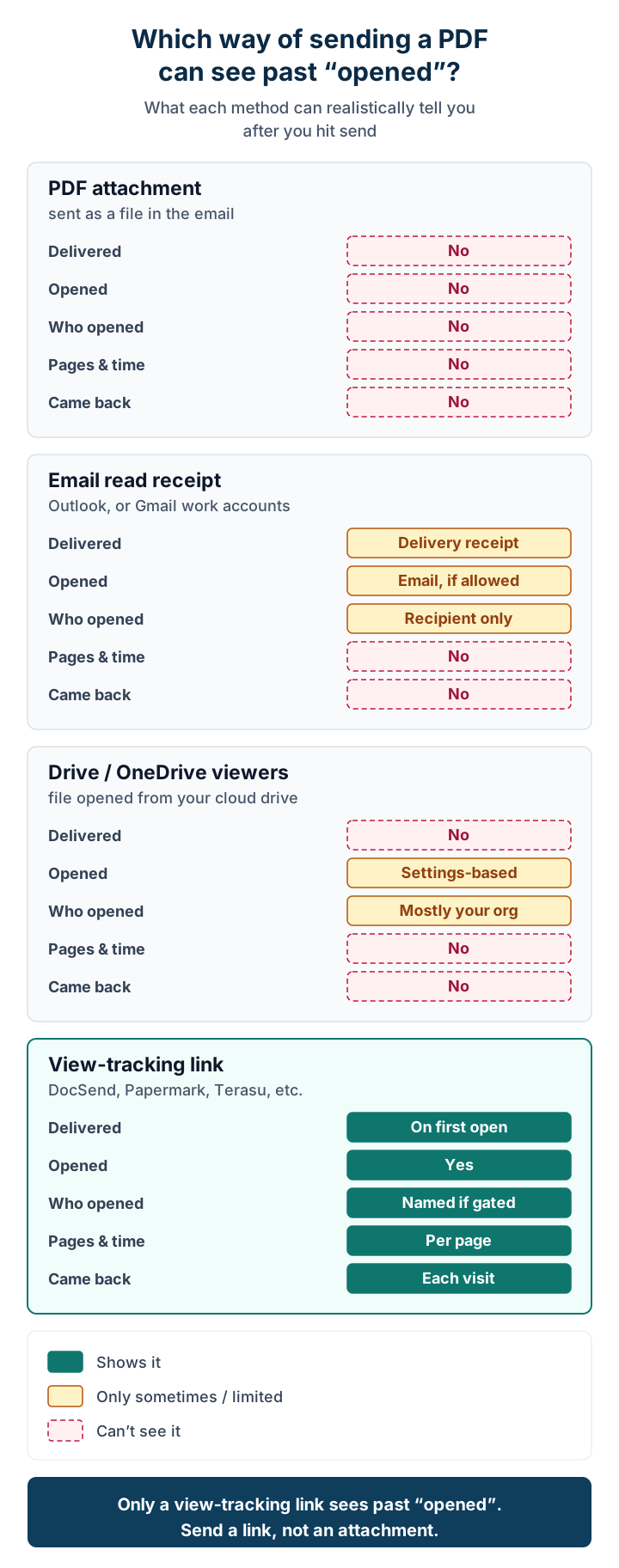
The next three sections cover each workaround, from least to most useful. After that, the guide covers what to do with the data.
Method 1: Email read receipts (unreliable, and about the email only)
A read receipt is a message the recipient's email system sends back to say your email was opened. It is the first thing most people try, and it has three built-in limits.
It tracks the email, not the PDF. A receipt says the message was opened. It says nothing about whether the attachment was opened, which pages were read, or whether the file was forwarded to the person who actually decides.
The recipient controls it. Microsoft's Outlook read receipt help page says the recipient "can decline to send read receipts," that there is "no way to force a recipient to send a read receipt," and that some email programs don't support them at all. The same page says the feature isn't available for IMAP or POP accounts such as Gmail, Yahoo!, or iCloud. It also suggests requesting receipts only for important messages, because people who get frequent requests become less likely to send them.
Gmail limits it to work and school accounts. Google's Gmail read receipt help page says read receipts "are only available to work or school accounts," not personal @gmail.com addresses. The recipient may need to approve the receipt first. No receipt comes back when you send to a group or alias. Some email systems may never return one.
A related tactic is the invisible tracking pixel that many email tools add to messages. It has the same weakness: it measures the email, and mail apps can get in the way. Apple's Mail privacy guide explains that with Protect Mail Activity turned on, remote content is downloaded privately in the background when a message arrives, not when it is opened. That breaks the link between "the pixel loaded" and "the person read it."
Use read receipts when you need a one-off signal that an internal colleague received an important email. Don't rely on them to learn whether a client read your proposal.
Method 2: Google Drive and OneDrive viewer lists
If you share a file from your company drive instead of attaching it, the drive can sometimes show who viewed it. This works well for colleagues. For external recipients it falls short.
Google Drive. Google's admin help page on the Activity dashboard says the dashboard shows "the names of users who have viewed Google Docs, Sheets, and Slides files and the time they viewed them." Four details matter for PDF tracking:
- It names Docs, Sheets, and Slides. The page doesn't say an uploaded PDF gets the same viewer list.
- You need edit access to the file. "Users can't view the Activity dashboard for files outside their domain."
- Whether an outside viewer's name shows up depends on their organization's admin settings. Admins can switch their users' views off entirely.
- Individual users can hide their own view history.
Google also says the dashboard isn't meant for auditing. It doesn't show which pages someone read or for how long.
OneDrive and SharePoint. Microsoft's page on viewer settings explains that site owners can turn on a feature that shows "the names of people who view files or pages on a site" on the file card. It only works "as long as your organization-level sharing settings allow it." Like Google's dashboard, it is a viewer list, not page-level reading data.
Use your drive's viewer list when the readers are colleagues in your organization and you only need to know who has looked at a file. Look elsewhere when the reader is a client, a prospect, or an investor, or when you care how far they read. For a closer look at the trade-offs of sharing sales materials from a drive, see Google Drive for sales collateral: risks and alternatives.
Method 3: A view-tracking link (the method that actually works)
A view-tracking link turns the question around. Instead of sending the file and hoping something reports back, you keep the PDF on a service you control and send a link. The recipient reads the PDF in their browser, and the service records the visit.
Here is how it works in practice:
- Upload the PDF to a document tracking tool.
- Create a share link and choose its settings: whether the viewer must enter an email address, whether downloads are allowed, and when the link expires.
- Send the link in your email instead of the attachment. A short line explaining what the link contains works better than a bare URL.
- Check the views in the tool: who opened it, when, which pages, for how long, and whether they came back.
- Update or revoke the file if needed. Because the PDF lives behind the link, you can fix a typo or switch off access after you send it, which you can't do with an attachment.
Several kinds of tools offer this. Some are dedicated document-sharing products. Dropbox DocSend shows time per page and where readers drop off, and can require an email and passcode before someone views a file. Papermark describes "per-page, per-viewer engagement analytics," lists a free tier for document sharing, and is open source. Others build tracking into a larger workspace, such as proposal tools and the shared client spaces covered later in this guide. If you are choosing between dedicated tools, our DocSend alternatives guide compares them. This guide stays on the method.
A few settings make the data far more useful:
- Ask for an email address when it matters. An open link that anyone can forward records views, but you may not know who the viewer was. Asking for an email address before viewing ties each visit to a person. It adds a step for the reader, so use it for proposals and pricing, not for a public one-pager.
- One link per recipient or per deal. If you send the same link to ten prospects, the data blends together. A separate link per recipient keeps it readable.
- Keep downloads off if you need the data. Once someone downloads the PDF, reading the downloaded copy is invisible again, just like an attachment.
What PDF tracking data you realistically get
A view-tracking link shows more than an attachment, but it doesn't read minds. This is what the data usually covers and how to read it.
| Signal | What it tells you | What it doesn't tell you |
|---|---|---|
| Opened (and when) | The link was opened, and at what time | That the person read it closely; a link preview or a quick tap also counts |
| Who opened it | The viewer's identity, if the link asked for an email | Who the viewer forwarded it to, unless they also entered an email |
| Pages viewed and time per page | Which pages got attention and which were skipped | Why they stayed: interest, confusion, or a meeting interruption |
| Return visits | The document came back up later, often when it is being discussed internally | Whether the discussion went your way |
| Number of viewers | More people on the buyer's side are looking at it | Their roles or how much say they have |
| No views | The link hasn't been opened in the tool | That they ignored it; they may have printed an earlier copy or discussed it on a call |
Two rules keep you from misreading it:
- Treat a single data point as a hint, not a verdict. A 40-second view of the pricing page might be a skim or a decision. Patterns are more reliable than single events: several viewers, return visits, or time spent on the same section across visits.
- Absence of data is not rejection. A buyer can be busy, waiting on someone else, or reading a printout. Silence calls for a helpful follow-up, not a conclusion.
How to act on PDF view data: timing and content of your follow-up
The point of tracking a proposal or deck is a better next message. Use the data to decide when to follow up and what to lead with, and never quote it back to the reader.
Timing. There is no research-backed "follow up X hours after an open" rule we could verify, so we don't give you one. A practical approach:
- Start from a normal cadence. Our proposal follow-up email guide suggests a confirmation on the day you send, then follow-ups about 2, 5, 10, and 21 business days later. That is a practical default, not a research-backed rule, and the guide says so.
- Let views move a follow-up earlier, not add more of them. If several people on the buyer's side open the document, or someone returns to it, that is a reasonable moment to send the follow-up you had planned anyway.
- If nothing has been opened by your next follow-up, resend the link with a one-line summary of what's inside, or try a different channel, such as a short call.
Content. Match the next message to what got attention without saying how you know:
| What the views show | A follow-up that fits |
|---|---|
| Long time on the pricing page | Offer to walk through pricing options or payment terms |
| Repeated visits to the implementation or timeline section | Propose a short call on scope and schedule |
| New viewers you haven't met | Ask your contact who else is reviewing it, and offer a version for them |
| The document stopped at an early page | Send a two-line summary of the main point, or offer a 15-minute walkthrough |
| No opens at all | Resend with a clear subject line and a one-sentence reason to open it |
To learn which sections and decks move deals across many sends, not just one proposal, see how to measure sales collateral with view tracking.
Privacy and consent: track openly
Tracking how a client reads your document is common in sales software, but readers don't always expect it. Being open about it protects the relationship.
- Say that you use it. A line such as "This link lets us see when the document has been opened so we can follow up at a useful time" in your email or on the sharing page is enough for most business relationships. Mention it in your privacy policy as well.
- Prefer tools that tell the viewer. Some services show viewers a notice when they are asked for an email address. In Terasu, share links that ask for an email show the viewer a notice that their email address, viewing dates, pages viewed, and viewing time are recorded for the sender, and deleted 30 days after the last view.
- Never use viewing details as a talking point. Use the data to choose what to say, not as something to say.
- Respect a "no." If someone asks for a plain PDF, send one.
- Check your obligations. Rules on tracking, consent, and personal data differ by country and state. If you sell into the EU or other regulated markets, check with your legal or privacy team before you turn tracking on for everyone.
Which way to track should you use?
The best method depends on what the PDF is part of. Here is the short version.
| Your situation | What to use | Why |
|---|---|---|
| Internal document for colleagues | Your company drive's viewer list | Already there, and colleagues expect it |
| A one-off deck, such as a fundraising deck sent to many investors | A dedicated document-sharing tool like DocSend or Papermark | Built for many recipients, per-link analytics, and access control |
| A proposal or materials in an ongoing client deal or project | A shared client space with view tracking | The PDF sits next to the messages, tasks, and other files for the same client |
| A quick personal email where tracking would feel odd | A plain attachment and a direct question | Sometimes the honest "Did you get a chance to look?" is the right tool |
For a one-off fundraising deck, a dedicated tool such as DocSend or Papermark is usually simpler than a client workspace: you upload, send a link to each investor, and watch the views. When the PDF is one of many materials you exchange with the same client over weeks or months, a shared client space fits better. If you are not sure what a shared client space is, start with what is a digital sales room?.
Tracking PDF views inside a client project with Terasu
Terasu is our product, so read this section with that in mind. It is a shared workspace for client work. Each client deal or project gets a Room, where your team and the client see the same files, messages, and tasks. Tracking comes with that sharing, so you don't need a separate tool for it.
According to Terasu's view analytics page and content analytics page:
- Who viewed which page, for how long. For PDFs shared in a Room, Terasu records each viewer and the seconds they spent on each page. Video watch time is recorded in 10-second segments. The client doesn't need to install anything.
- Which of your files work across projects (Solo and Business plans). Content analytics scores each file by view rate, view time, and completion across all your projects, and shows which page of a PDF is barely read. Scores refresh every 6 hours.
- Share links outside the Room. You can also create a share link from the Room's files page. Views through share links are recorded separately from Room views. With the "anyone with the link" setting, they count as anonymous views per browser.
Plans, per the pricing page (checked November 14, 2026): the Free plan includes view logs. Solo, Starter, and Business add detailed view analytics (listed as "Advanced analytics" on the pricing page). Content analytics scoring, AI answers about the Room (Room Context Intelligence), and the stakeholder map are on Solo, Business, and Enterprise, not on Starter. Every new workspace gets all Business features for 14 days, with no credit card.
Where Terasu fits: you send proposals, estimates, and project documents to the same client over time, and you want to see which person on the client side opened which file, next to the rest of the deal. Where it doesn't: you need to send one deck to dozens of investors or prospects and only care about the views. A dedicated document-sharing tool is simpler for that, and Terasu doesn't include e-signature.
Share the proposal in a Room, not as an attachment
See which client stakeholder opened which file and how far they read, next to the messages and tasks for the same deal. All Business features free for 14 days, no card.
Start freeFrequently Asked Questions
How can I tell if someone opened my PDF?
If you sent it as an email attachment, you can't. The file sits on the recipient's device and nothing reports back. To know whether a PDF was opened, share it through a view-tracking link, which records each open, the pages read, and the time spent on each page.
Do read receipts show whether my PDF attachment was opened?
No. A read receipt only reports that the email was opened, and only if the recipient's system sends one. Outlook lets recipients decline, and Gmail supports read receipts only on work or school accounts. Neither shows whether the attachment was opened.
Can Google Drive show who viewed my PDF?
Only in limited cases. Google's Activity dashboard shows viewers of Docs, Sheets, and Slides files, you can only see it for files in your own domain, and viewers or their admins can hide view history. It doesn't show pages read or time per page.
What is document tracking software?
It's a tool that hosts your file behind a share link and records what happens when people open it: who opened it, when, which pages they viewed, for how long, and whether they returned. Many tools also let you require an email address, block downloads, or revoke access.
Is it legal to track who opens my PDF?
Rules on tracking and personal data vary by country and state, so check with your legal or privacy team for your markets. Whatever the rules, tell recipients that the link records views, and send a plain file to anyone who asks for one.
When should I follow up after someone views my proposal?
Keep a normal follow-up cadence and let views move a planned follow-up earlier, for example when several people on the buyer's side open it or someone returns to it. Lead with the topic they focused on, but don't mention that you saw them reading.
Conclusion
You can't track a PDF attachment, and read receipts only tell you about the email, when the recipient allows it. Drive and OneDrive viewer lists help with colleagues but not with clients. To know whether someone opened your PDF, which pages they read, and whether they came back, share it as a view-tracking link. Tell readers you do it, and use what you learn to time and focus your follow-up. For a one-off deck, a dedicated document-sharing tool is the simplest route. For proposals and files in an ongoing client relationship, keep them in one shared space with the rest of the deal.
Further reading:
- Proposal follow-up emails: templates and cadence
- Sales collateral: how to measure impact with view tracking
- Google Drive for sales collateral: risks and alternatives
- DocSend alternatives
- What is a digital sales room?
Sources checked November 14, 2026: Microsoft Outlook read receipts, Gmail read receipts, Google Workspace Activity dashboard, Microsoft SharePoint/OneDrive viewers, Apple Mail privacy, Dropbox DocSend, Papermark, and Terasu's pricing, view analytics, and content analytics pages.
Further reading
- Proposal & Quote Follow-Up Emails: 15 Templates, Subject Lines & a Day-by-Day Cadence (2026)
- Sales Collateral: Types, Funnel-Stage Map, and How to Measure Impact [2026]
- Google Drive for Sales Collateral: 3 Hidden Risks & the DSR Alternative (2026)
- What Is a Digital Sales Room? How It Works & Why It Matters (2026)
- Best Digital Sales Room Software (2026): 7 Tools Compared Fairly + Switching Guide