Managing the responses you receive
Contacts collected through Terasu Signal are managed together on the Responses screen. Reading activity and follow-up status sit side by side, so nothing has to be copied into a spreadsheet.
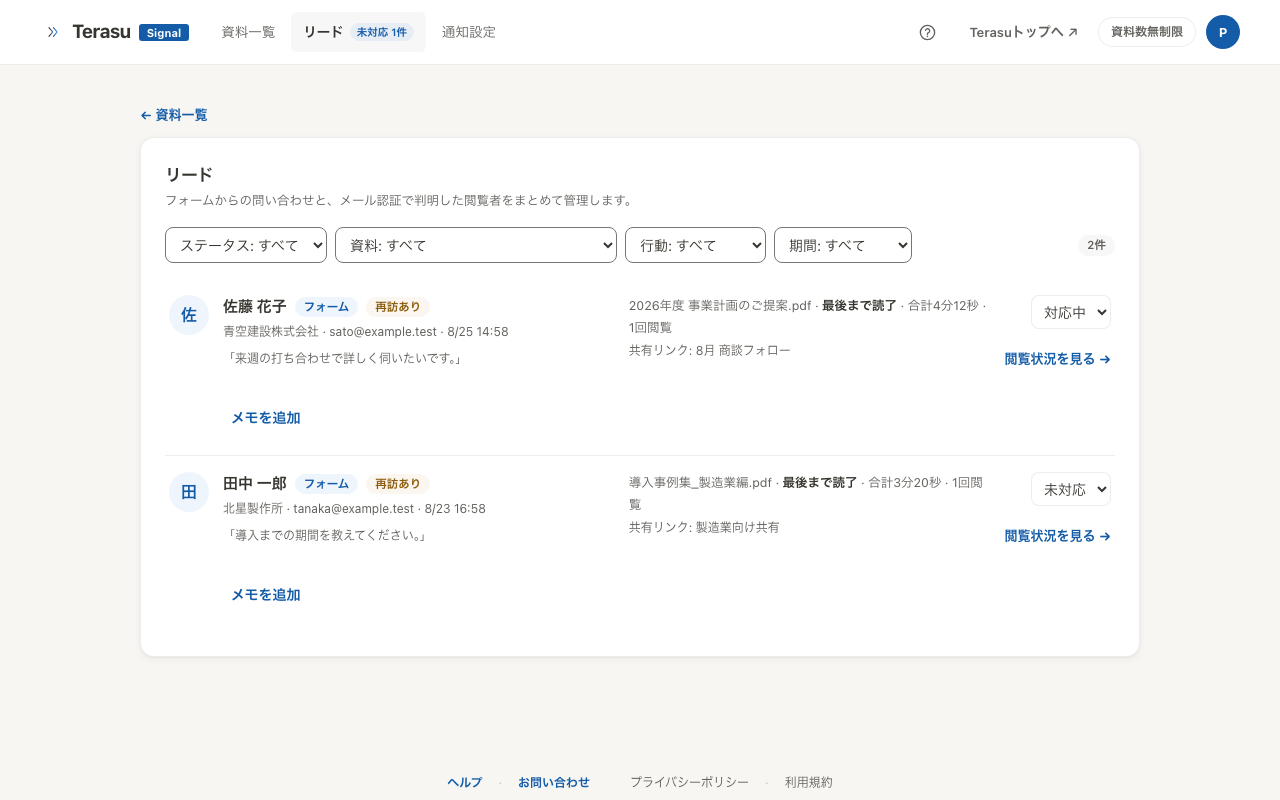
Two ways responses arrive
| Source | Created when |
|---|---|
| Form | An inquiry is submitted through a form link |
| Email verification | Verification succeeds on a link that requires it |
A form link is a public link with an inquiry form attached to the document. Publish it on your website and you receive the reader's contact details and message.
For verification, see Identify readers with email verification.
Track progress with statuses
Each response carries a follow-up status.
| Status | When to use it |
|---|---|
| Unhandled | Just arrived, nobody has touched it |
| In progress | You have started reaching out |
| Meeting | A meeting is booked |
| Settled | The request was agreed |
| Declined | Not moving forward this time |
When unhandled responses exist, the count appears in the navigation at the top of the screen, so they are hard to miss.
You can also filter by period. Choose Last 7 days or Last 30 days in the period filter to show only responses received during that window.
Statuses are both a record of your follow-up and the material for reviewing which links actually led to settled requests. Recording Declined as well as Settled makes that review far more accurate.
Leave notes
Each response has a note field. Recording what was said on a call, or what you plan to do next, lets you pick the thread back up after a gap.
Prioritise by reading activity
The response list shows reading state next to contact details.
Two responses can both be Unhandled while having very different temperature: one has read the document through to a Revisit, the other stopped at Opened. Calling the revisiting reader first produces better results.
Filters let you pull out responses by behaviour — people who reread the document, people who finished it, people who have not opened it in a week. It is a practical way to decide who to call today.
Unlocking form responses
Once you pass the free allowance (one per month), the contact details and message of a form response stay locked until they are unlocked. A balance unlocks them automatically; without one, you can unlock each response individually. See Balance and unlocking for how it works and what it costs.
Related articles
- Identify readers with email verificationVerify an email address before the document opens, so you know who read it — including people it was forwarded to
- Getting started with Terasu SignalShare a PDF without signing up and see when, by whom, and how far it was read
- Share link settingsUse PIN, expiry, download control, and stopping to send documents outside your company with confidence
- Balance and unlockingWhen read-link details and form responses become paid, with the free allowance, unit prices, prepaid balance and the auto-unlock cap