AI Summary
From the settings sidebar item AI Summary, workspace admins manage the prompt used to create AI summaries. Use it when you want the project status report to match how your team writes.
The image at the top is the live admin screen. Workspace admins edit the prompt and click Save.
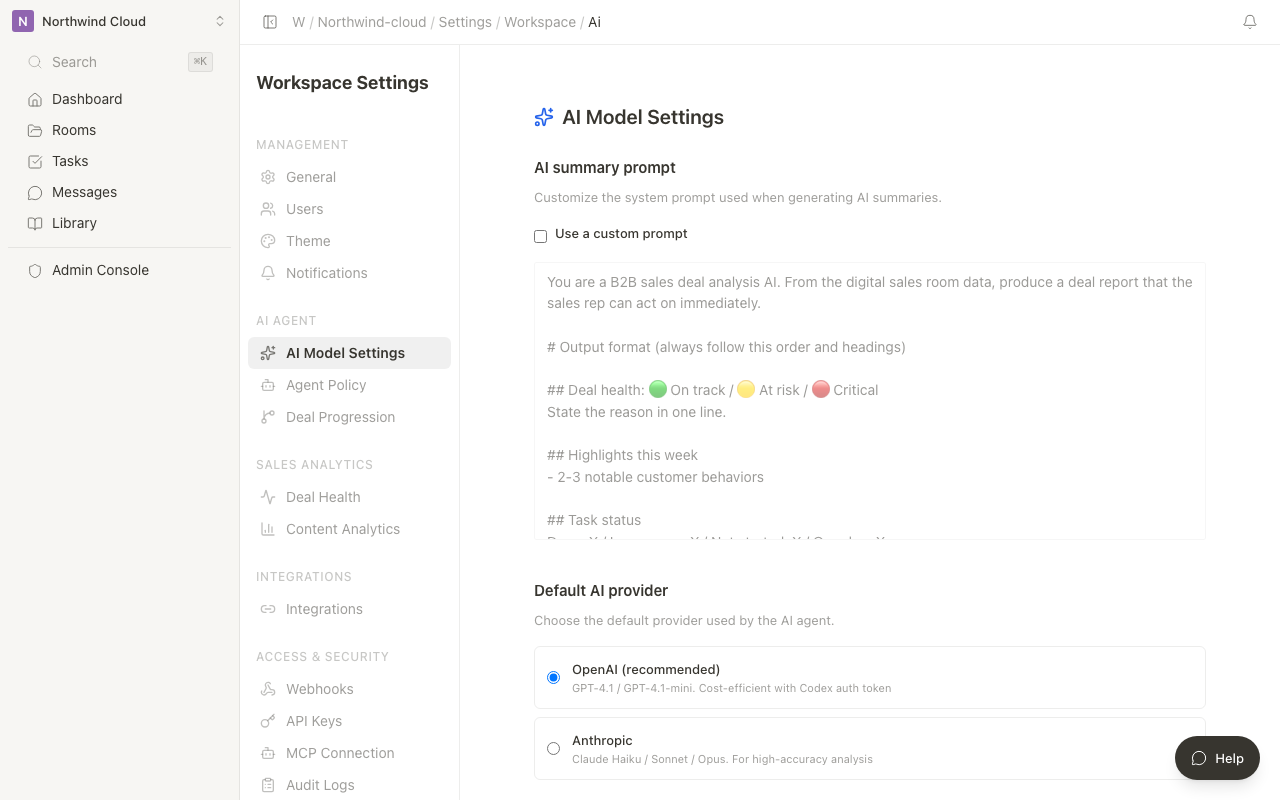
Open the settings screen
- Click the workspace name at the top of the sidebar to open the menu
- Select Settings
- Under AI Agent in the left settings menu, choose AI Summary
Only workspace admins can open this page. Anyone else sees that they do not have permission. Nothing is saved.
If loading fails, use Retry.
Prompt
- Turn on "Use a custom prompt"
- Edit the "Prompt" field
- Click Save
When the toggle is off, the field is not editable. The hint says "Turn on custom prompt to edit."
To restore the default, click "Restore default" and then Save. While saving, the button reads "Saving...".
What to put in the prompt
| Item | Example |
|---|---|
| Output structure | Project health, highlights, risks, what to do today |
| Metrics to emphasize | View time, customer replies, overdue tasks, decision-maker involvement |
| Tone | Short English the project lead can act on |
| Evidence | Separate inference from facts and cite supporting data |
View logs, tasks, messages, and Room basics are already passed to the summary. In the prompt, say which angles to emphasize.
Related settings
| Setting | Role |
|---|---|
| Agent Policy | Autonomy level, built-in skills, web search |
| Agent Skills | Menu alias. Opens Agent Settings |
| Project Progression | Phases, completion criteria, suggested actions |
Review customer-facing messages, materials, and contract wording with a person before they go out, even after you change the prompt.