Last updated: 2026-05-08 · 3 min readBusiness〜

Pipeline Intelligence

Pipeline Intelligence is a feature where the AI analyzes deal status across your entire workspace and automatically generates digests, alerts, and rep performance for managers.

Pipeline dashboard

Display on the dashboard

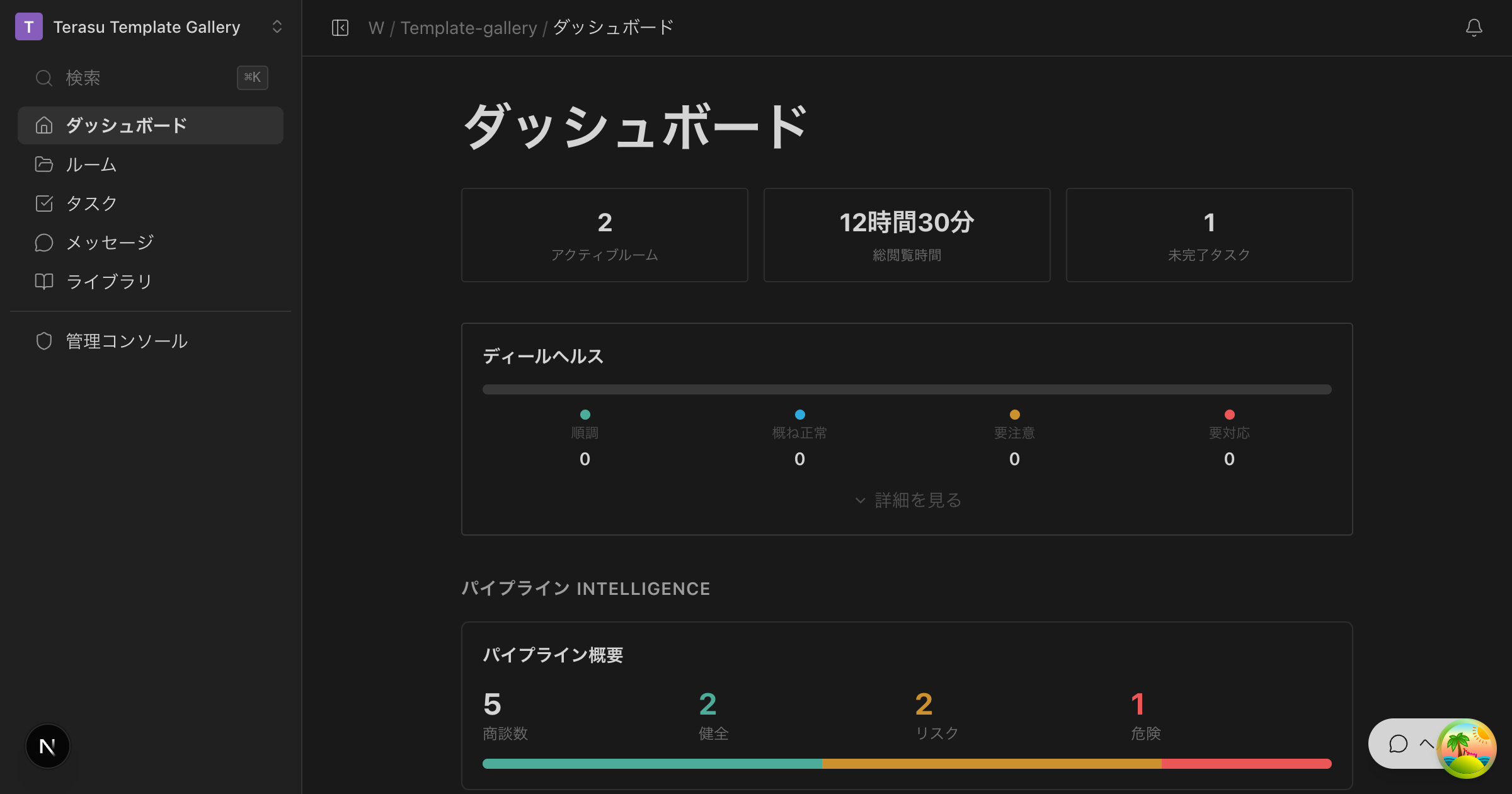
The "Pipeline Intelligence" section of the dashboard shows the following three cards.

Pipeline overview

A summary card that lets you grasp the overall health of your deals at a glance.

MetricDescription
DealsThe total number of active deals (Rooms) in the workspace
HealthyThe number of deals progressing smoothly (green)
At riskThe number of deals that need attention (yellow)
CriticalThe number of deals that need immediate action (red)

A progress bar visually shows the proportion of healthy, at-risk, and critical deals.

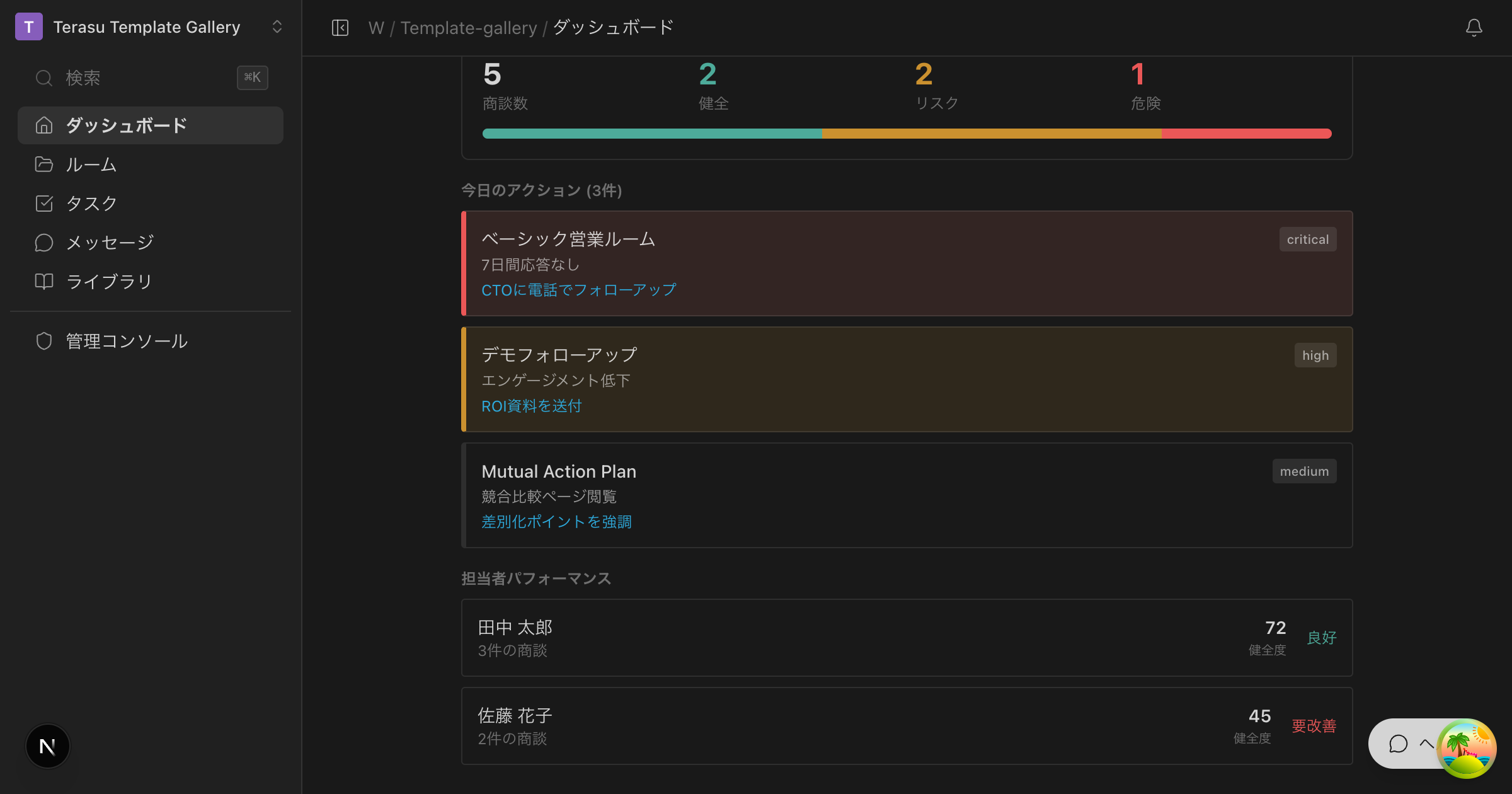
Today's actions

Alerts and rep performance

A list of important alerts and recommended actions detected by the AI.

Each alert includes the following information.

ItemDescription
Room nameThe deal Room in question
Alert contentAn explanation of what is happening (e.g., no response for 7 days)
SeverityA critical / high / medium badge
Recommended actionA specific action proposal with a link

Clicking the link in a recommended action takes you directly to the relevant Room screen.

Rep performance

A list that scores each sales rep's deal status.

ItemDescription
Rep nameThe name of the sales rep
DealsThe number of deals the rep is handling
HealthThe average health score of the rep's deals (0–100)
StatusA healthy / caution / critical badge

How the daily digest works

Pipeline Intelligence data is automatically generated by a daily batch process.

  1. The batch process runs at a scheduled time each day
  2. It aggregates the agent data of all Rooms in the workspace
  3. The AI analyzes deal health and generates alerts
  4. It calculates a performance score for each rep
  5. The dashboard data is updated

Slack integration

Pipeline Intelligence information can also be reviewed via Slack.

The /terasu pipeline command

When you type /terasu pipeline in Slack, the latest pipeline digest is shown as a Slack message.

What's displayed:

  • Deal count and health distribution
  • Important alerts (top 3)
  • A link to the dashboard

To use the Slack integration, you first need to set up the Slack integration.

Tips for making the most of it

For managers

  • Morning routine: Review "Today's actions" on the dashboard and use it to direct your team
  • 1-on-1 meetings: Base your feedback on concrete numbers from rep performance
  • Better forecast accuracy: Identify critical deals early and decide how to reallocate resources

For sales reps

  • Prioritization: Address deals with critical alerts first
  • Avoiding oversights: Catch hard-to-notice changes such as declining engagement

Pipeline Intelligence analyzes only deals that have an agent configured in the Room. Rooms without a configured agent are not included in the digest.

Pipeline Intelligence | Help center