AI Material Creation
AI material creation builds decks and pages from the Room context in stages, then can emit PPTX. Approve outlines from Agent Inbox as well as from a Room.
Overview
- Request material creation from the Room's AI sidebar
- Use transcripts, notes, PDF/PPTX files, and Room pages as sources
- The AI builds the structure, claims, presentation approach, and slide specs, then automatically generates the PPTX
- After generating the PPTX, it runs an image preview and quality check, then saves the result as a deliverable
- Reflects your workspace's brand colors, logo, and slide theme
How material creation works
-
Request material creation: In the Room AI sidebar on the right, describe the material you want to create.
Examples:
- "Create a 5-slide proposal deck comparing ROI."
- "I want a deck that includes a feature comparison table against competitors."
- "Create a proposal as a page summarizing customer case studies."
- "Create a one-slide summary for the next proposal from this transcript."
-
Build the structure and sources: The AI agent reads the information in the Room and organizes who the material is for, what decision it should drive, and which sources are available.
It mainly produces the following:
- request intake: the request, use case, audience, and success criteria
- evidence map: confirmed facts, hypotheses, unconfirmed items, and assertions to avoid
- deck outline: the chapter structure and the role of each slide
- claim spine: each slide's claim, "so what," and decision points
- visual brief: which diagrams, tables, charts, or comparison tables to use to convey the message
-
Create slide specs: For each slide, the AI decides on the composition, widgets, presentation density, amount of text, and sources. Rather than writing arbitrary rendering code, the AI selects pre-designed components provided by Terasu.
-
Generate the PPTX and preview: Terasu's renderer creates the PPTX and generates slide images, a contact sheet, and a layout report. The quality check looks for broken text, leaked JSON, overcrowding, unsupported assertions, and more.
-
Download the material or save it to the Room: When generation is complete, a result card appears:
- Download PPTX: Download in PowerPoint format
- Insert into Room: Automatically added to the Room's file list
- Save as a Page: Save as a page within the Room
- Check the preview: Review the generated slide images and quality check results
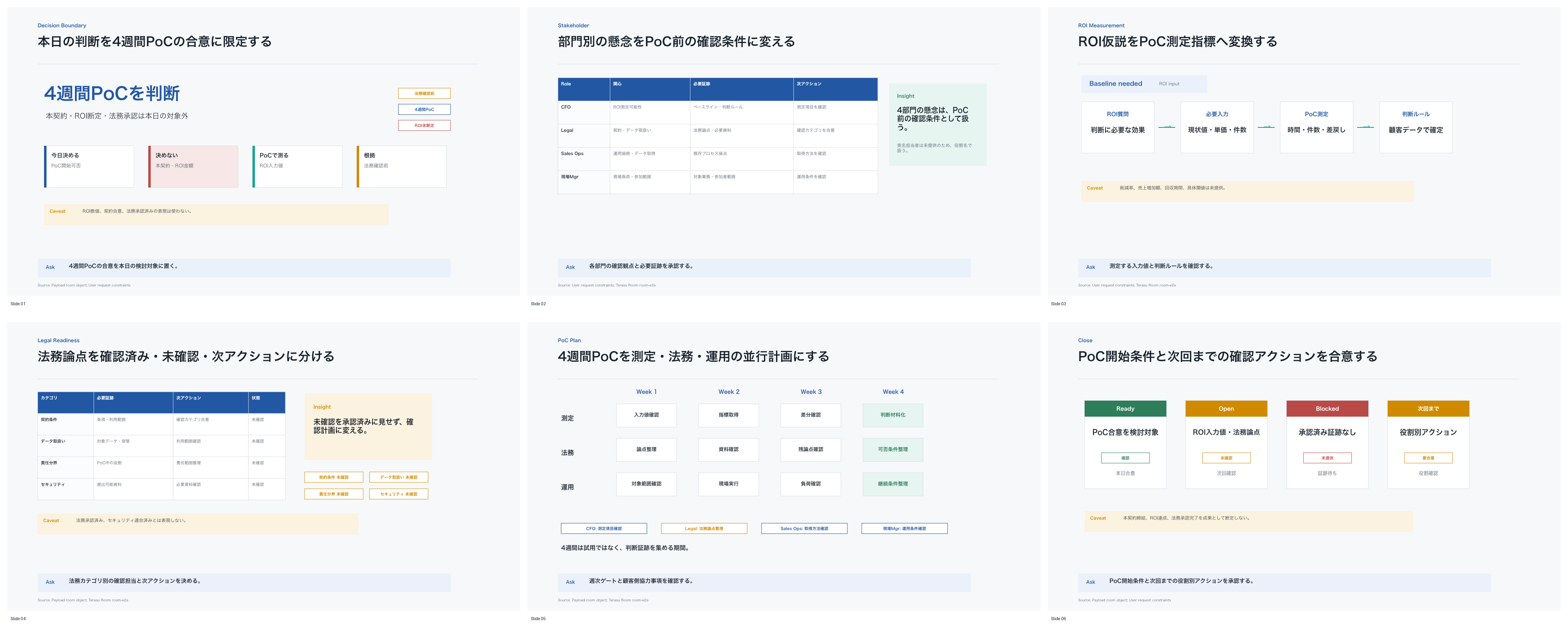
Supported formats
| Format | Description | Output |
|---|---|---|
| Slides (PPTX) | Proposal deck in PowerPoint format | .pptx file |
| Page | Page content within the Room | BlockNote page |
Information you can use as input
| Information | How it's used |
|---|---|
| The page you currently have open | Used as the AI sidebar's automatic context |
| The whole Room | References tasks, messages, stakeholders, and viewing activity |
| Intake information | Uses transcripts, notes, emails, chats, and PDF/PPTX files as sources |
| File attachments | Drag and drop onto the AI sidebar to turn them into a deck on the spot |
Internal sources and internal notes are not shown on materials or Pages published to customers. The basis is information for internal users on the Room-creator side to review.
Available presentation patterns
The AI combines Terasu's pre-designed patterns to match the material's purpose and each slide's claim.
| Pattern | Use case |
|---|---|
| executive summary | Condenses the conclusion, decisions, basis, and next actions into one slide for executives |
| decision brief | Organizes what to decide today, what not to decide, and what to take back |
| issue tree | Breaks down the problem and shows where to apply solutions |
| stakeholder map | Visualizes stakeholders' interests, influence, and concerns |
| risk register | Organizes risks, impacts, countermeasures, owners, and deadlines |
| legal review map | Organizes review points such as contracts, SLAs, data retention, and permissions |
| ROI bridge | Connects current workload, room for reduction, and the metrics to measure in a PoC |
| option comparison | Compares Terasu, the current operation, and alternatives |
| mutual action plan | Organizes the customer's and your next actions on a timeline |
| evidence pack | Organizes the sources used, confirmed information, and unconfirmed items |
Even if you don't say "I want a comparison table" or "I want to show ROI," the AI agent selects the presentation patterns that fit the material's purpose. If you have a clear preference, you can specify it, such as "Center it on a risk table for the legal team" or "Start with a one-slide summary for executives."
Theme settings
The brand colors and fonts set under Workspace settings > Theme > "Slide generation theme" are automatically reflected in your materials.
If no brand colors are set, Terasu's standard theme is used. For materials aimed at important customers, we recommend setting your logo, brand colors, and formatting rules in advance.
Quality check
After the PPTX is generated, the work doesn't simply end there—it is actually converted into slide images so the quality can be verified.
| Check | Content |
|---|---|
| Rendering | Creates slide images and a contact sheet from the PPTX |
| Display issues | Checks for text overflow, overcrowding, insufficient margins, and broken images |
| Generation leaks | Checks whether JSON or Markdown is appearing in the body |
| Sources | Checks whether strong claims have a source reference |
| Ready to send | Checks whether the quality is good enough to send to an important customer as-is |
If the quality check finds an issue, the AI agent revises the slide specs and regenerates. The final deliverable is linked not only to the material itself but also to its preview and quality check results.
Frequently asked questions
How long does generation take?
It depends on the length of the material, the amount of information in the Room, and whether a PPTX preview is generated. Light materials of a few slides finish quickly, but proposal decks and materials that include legal or ROI review can take from tens of seconds to a few minutes due to structure building and rendering QA.
Is the AI rendering slides freely?
No. The AI decides what each slide should convey, which presentation pattern to use, and which data to feed in. The actual PPTX rendering is handled by Terasu's pre-designed renderer.
Is the logo added automatically?
If a logo is set for the workspace, it is automatically placed on every slide (larger on the title slide, smaller on the rest).
Can customers see the generated material right away?
No. Generated materials are first created as deliverables for internal users. If you want to share them with a customer, check the Room addition or publishing settings.
Related articles
- Agent InboxHow to approve or reject pending proposals across Rooms from the workspace inbox.
- Feeding External Information to the AI AgentHow to feed transcripts, notes, chats, PDF/PPTX files, and information from Gmail, Meet, Zoom, the Chrome extension, and Slack/Teams into a Room for search, analysis, and proposals
- Decision TimelineHow to review customer confirmations, AI signals, and decision context in chronological order
- Project Progression SettingsHow to manage client-project phases, completion criteria, and suggested actions